@Andermaiden2nd note added into first post 
M
Best posts made by miro1360
-
RE: example: Save variables into file and read them back [advanced]posted in Tutorials by Users
-
RE: how control if i want buy before candle close by five second ?posted in Questions & Answers
easiest example, connecting blocks minutes+seconds as I said you in first reply,,,,, every 15 minutes, that means at 14min45s, 29min45s, 44min45s, 59min45s:
https://fxdreema.com/shared/ahYvLH0E
you can do this also for other periods, for M5 candles (04m45s, 09m45s, 14m45s, 19m45s, 24m45s, 29m45s, 34m45s, 39m45s, 44m45s, 49m45s, 54m45s, 59m:45s) ... etc.note one thing, you are working with onTick section, that means, blocks are runing tick after tick, but situation can happen, when no tick arrived in time interval 14min45s-14min59s and when no tick arrived - your blocks are skipped and EA is waiting for next time interval
here is more complicated example with every minutes that can be set:
https://fxdreema.com/shared/ibSC6YfVand this one is more precisely working with on Timer section, which is not depending on ticks and blocks are not skipped when are missed ticks (as in first example), but you can not test this with tester (tester is not supporting onTimer), only with demo:
https://fxdreema.com/shared/mBV1TnxVdnote: I have tried only first example in tester and was working for me, the next 2 examples must not working, who knows

again, investigate more effort into creativity - it is only way
... fast all is possible with fxdreema ... -
RE: How to use ZigZag [advanced]posted in Tutorials by Users
the whole project is about this what you asked ...
variables:
var_zz_H0_ID, var_zz_H1_ID, var_zz_H2_ID
var_zz_L0_ID, var_zz_L1_ID, var_zz_L2_IDif you compare them as this:
var_zz_L0_ID < var_zz_H0_ID, if the condition is true, then you know that L0 is the last zigzag leg (pointing down), and you know where is L1
if the condition is false, then you know that H0 is the last zigzag leg (pointing up), and you know where is H1ID is not the price, it is ID of specific zigzag candle ...
prices are variables without ID (var_zz_L0, var_zz_H0, ...) -
RE: plz help me make eaposted in Questions & Answers
it is not possible to fix because your indicator "repaints", that means it recalculates few history candles and is holding own peak to lowest/highest point (something like zigzag) ...
-
RE: Tutorial 01 - EMA cross, part 1 [beginners]posted in Tutorials by Users
It is called "counter trend trading" - in other words "selling tops, buying bottoms"
-
RE: RSI XOver Issueposted in Questions & Answers
maybe it is issued with "Candle ID" because current candle have ID 0 (and is not closed and can close far away from its open price)
... try to give in condition block (in More settings) Candle ID to 1 ... -
RE: Video Tutorial - Signals Dashboard EA [advanced] - looping Objects, arraysposted in Tutorials by Users
it can be done, buttons for controlling the visibility of objects (they are not removed, but shifted away from the chart)
you can separate the BE for each chart or you can do it like this for a better view:
https://fxdreema.com/shared/eigVnyG1c
some loops are now slightly changed (so that the state of the button and the BE data must be preserved and cannot be redrawn if it already exists)
... I have not tested the BE functionality (if does it trigger at all), you can test it ... if that doesn't work, there may just be a little change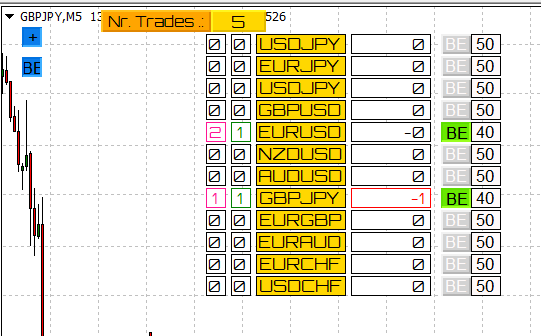
-
RE: sell stop and buy stop ?posted in Questions & Answers
many ways how to do it ...
the easiest is way is using OCO mode: Yes in pending blocks:
https://fxdreema.com/shared/0gbtxAEqdor other ways with OCO false +blocks in on Trade section:
notice, here I used "false output connections for possitive condition question" - some people dont like this way you can remake it for yourself ...
limits example:
https://fxdreema.com/shared/GDF9SbnIdstops example (with reduced blocks and negative condition question with true output):
https://fxdreema.com/shared/pVRJ6lNMcdont forget, for last two examples are both section used - on Tick and on Trade:
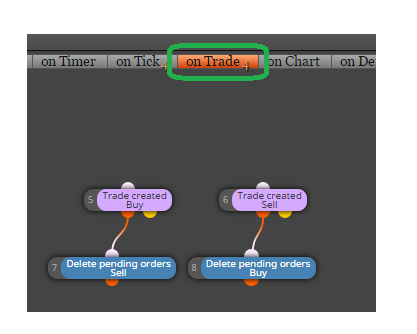
fxDreema allows you many ways how you can solve your question, just try+test+try+test+...and never give up
-
RE: Variables and Formula..posted in Questions & Answers
this save previous day High and Low price into variables aa and bb
than using formula calculade mid price cc
compare this calculated price with current price and if is > and is not opened buy, open buy ...
https://fxdreema.com/shared/Eid2CtX0d -
RE: How to place Break Even?posted in Questions & Answers
better you ask it here:
https://fxdreema.com/forum/category/2/Working-with-fxDreemabut anyway ... breakeven must be connected with other block, the same like trailing:
https://fxdreema.com/examples#Trailing... -
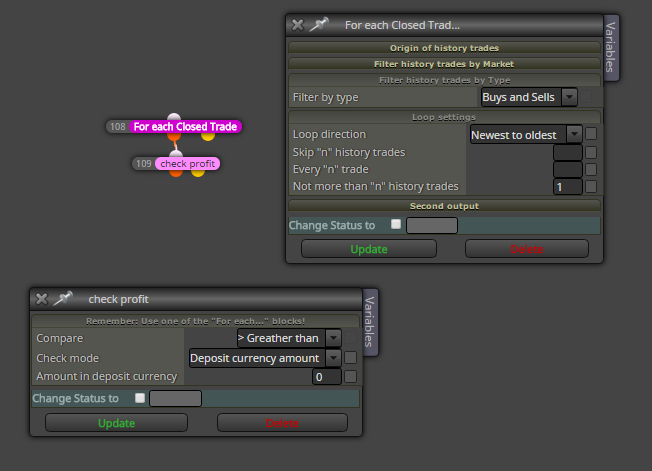
RE: Question about CHECK PROFIT!posted in Questions & Answers
blocks are runing one after another in one tick, from top block/blocks ... that means something like this:
here are Top blocks ...
https://fxdreema.com/forum/uploads/files/1484164252027-upload-21b5ef27-0a10-4172-8bb2-2693e263b502.pngthat means your top block is nr1 No trade -- it is only one top block ... do you know what it means? .... some of your blocks are not running ... or is it ok?
-
RE: Question about CHECK PROFIT!posted in Questions & Answers
you can try do this in "on Trade" section --- when you click into this "on Trade" window/section, new blocks appears to working when trade action happens (like trade closed on tp/sl, etc) ... and try test them
-
RE: Indicator over indicator for x candleposted in Questions & Answers
just check cross +2 candles behind ... it makes "shift" for it to align with 5MA
...
5MA[4]<20MA[4]
5MA[3]>20MA[3]
5MA[1]>20MA[1]
Buynote: [4] means CandleID 4
-
RE: Put stop orders after immediately closed candle's high/lowposted in Questions & Answers
https://fxdreema.com/shared/7AnscAEkd
section on Trade and on Tick are used
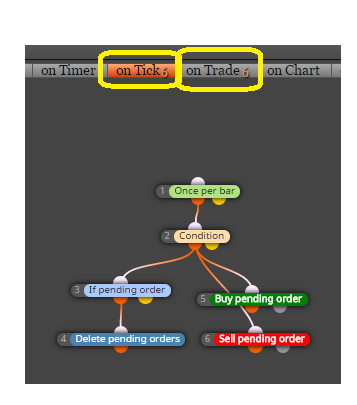
timeframes are set to H1, you can change it to "current" or what you will ... but be careful because if you select time 02:00 and use H4 or D1 candle, trades are not opened (because of logic) ... just do changes for your purposes ...
-
RE: wait and watchposted in Questions & Answers
while looking for Condition2, Condition1 must be true? .. easily connect Condition1 with Condition2
or
while looking for Condition2, Condition1 can be false? .. for this situation you can use Flag, Set flag and Check flag ... with Set flag you set some state, like:
Condition1 is true --- Set flag 1
now with Check flag look if flag == 1, when true, look Condition2 ...
when Condition2 is true, do something and Set flag back to 0
this is example for second situation:
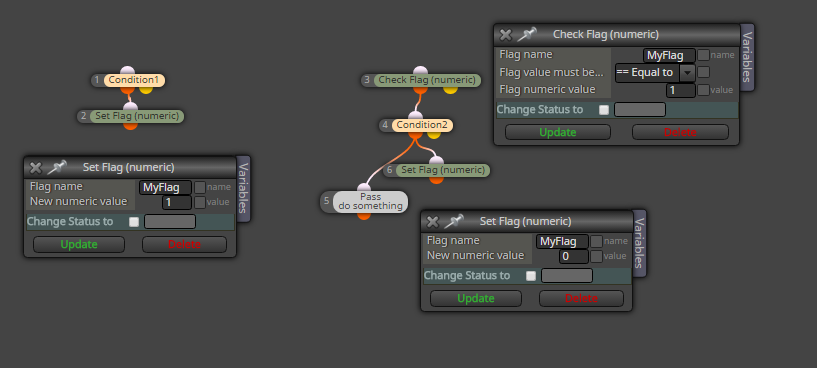
-
RE: Cannot make Z-Orders workposted in Questions & Answers
what I think, z-order in mql is meaning not for "visible order" but for selectable order, that means when you have object at deepest bottom with highest z-number, and obove are next objects with lower z-numbers, when you come with mouse above and select object - first object which is selected is one with highest z-number ...
--- and objects order is based on time when they were created, it means at top of objects is last created object, not object with highest z-number ...
... when you will have object as top, you need re-create it -
RE: miro1360 help pleaseposted in Questions & Answers with standard blocks this need a lot of blocks and loops which check closed trades and count them and based on counting results edit lots for new trade ... this is not easy to do but it is possible to do ... but it takes hours of work to complete it correctly ... ....
another way is create custom code (or new block in studio) but this need programming skill and also take a lot of time and testing (longer as using standard blocks, but result is nicer) ...question is, have you tried this strategy with tester manually? because if exist situation which leads to big volume accumulated on a lot of lossable trades in row, there is big chance that result fails