fxDreema

    • Register
    • Login
    • Search
    • Back to the main page
    • Categories
    • Recent
    • Tags
    • Popular
    • Search
    1. Home
    2. OntradingX
    3. Posts
    • Profile
    • Following 1
    • Followers 7
    • Topics 120
    • Posts 427
    • Best 28
    • Controversial 1
    • Groups 0

    Posts made by OntradingX

    • RE: Record, gains, loss and operations by day.

      @l-andorrà I just need them to be displayed on the screen, the biggest problem is that it has to be something daily and it may be necessary to work with a matrix for this. the mt5 report generates an excel and I'm trying to get this information through it.

      posted in Questions & Answers
      OntradingX
      OntradingX
    • Record, gains, loss and operations by day.

      Hello friends, can you help me to produce a logic to find some data???
      Below what I want to find and register:

      Operations Record:

      1. Maximum amount of Operations per day.
      2. Minimum number of Transactions per day.
      3. Average number of Transactions per day.

      Earnings record:

      1. Maximum amount of Earnings per day.
      2. Minimum amount of Earnings per day.
      3. Average amount of earnings per day.

      Loss record:

      1. Maximum amount of Earnings per day.
      2. Minimum amount of Earnings per day.
      3. Average amount of earnings per day.

      At the end, I want to generate a report informing me of all this so that I can generate for each EA that I develop a type of management based on the potential number of operations, daily gains and losses.
      Does anyone have any example projects with this?

      posted in Questions & Answers
      OntradingX
      OntradingX
    • LIMITATION or BUG ??? Block " Set "Current Market" for next blocks"

      I'm trying to monitor 50 symbols using this block, but I realized that for some reason that I don't know the block doesn't allow 21 symbols to be exceeded.

      e1ef92ac-82fd-46b5-bb62-d24436d482d5-image.png

      Projetct block for tests> https://fxdreema.com/shared/t1NeDb90c

      How did I find out???
      Answer: I created a project where I am trying to get data from 50 assets simultaneously, it can be for example an RSI, so I simply write the name of the 50 symbols, or I try to just write the name EURUSD 50 times (separated by commas).
      I noticed that the block when adding the EA on the screen and copying and placing the (50) EURUSD lets them be inserted, but if you press (ok) then the EA automatically deletes it leaving only 21 EURUSD symbols.
      @fxDreema Can you please check if it is a limitation and if so, can you increase it to up to 100 assets??
      If it's not a limitation, can you guide me on how to solve this or even if it's a BUG, can you fix it?

      posted in Questions & Answers
      OntradingX
      OntradingX
    • RE: Finally, News Filter for MT5 in 1 easy to use Block !!

      @lucag you is correct, great information.

      posted in Tutorials by Users
      OntradingX
      OntradingX
    • RE: Finally, News Filter for MT5 in 1 easy to use Block !!

      @lucas-farias-de-almeida Oi lucas, para que isto funcione adequadamente são vários passos, inclusive um que talvez esteja faltando ai do seu lado é o do bloco comentário para exibir os dados da noticia. Me chame no reservado e talvez eu possa lhe ajuda no telegram.

      posted in Tutorials by Users
      OntradingX
      OntradingX
    • RE: Finally, News Filter for MT5 in 1 easy to use Block !!

      image.png

      posted in Tutorials by Users
      OntradingX
      OntradingX
    • RE: Finally, News Filter for MT5 in 1 easy to use Block !!

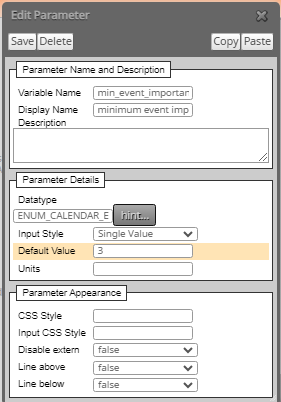
      @Dre ENUM_CALENDAR_EVENT_IMPORTANCE is correct

      posted in Tutorials by Users
      OntradingX
      OntradingX
    • RE: Finally, News Filter for MT5 in 1 easy to use Block !!

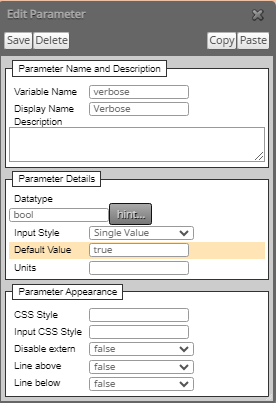
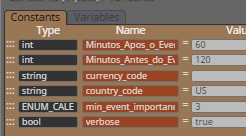
      @Dre please, print your screen (constants and variables) here

      posted in Tutorials by Users
      OntradingX
      OntradingX
    • RE: Finally, News Filter for MT5 in 1 easy to use Block !!

      @Dre
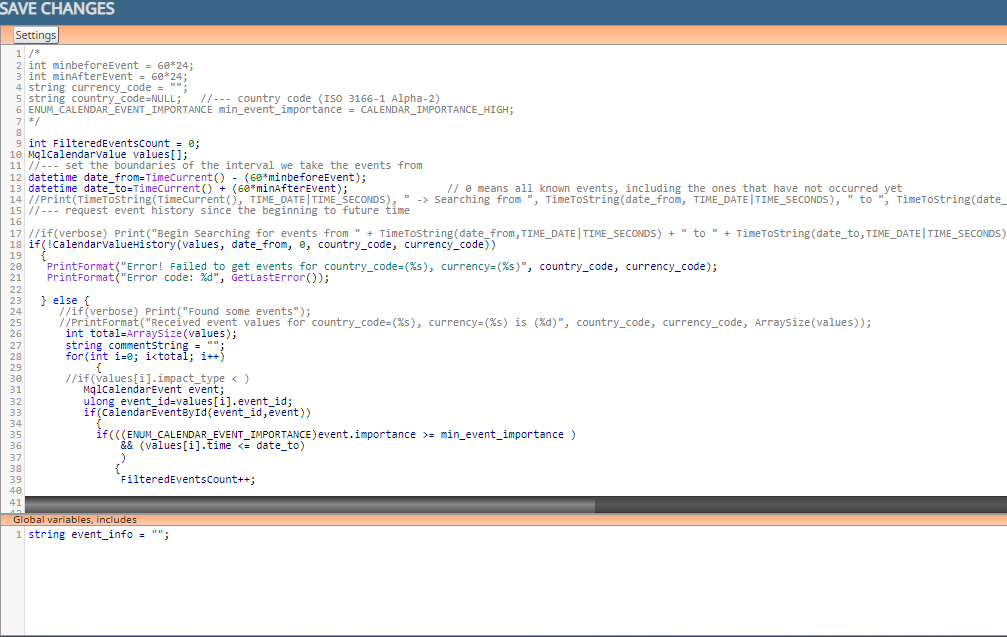
      93f3d555-a286-4948-95eb-fb142b7f30d7-image.png

      below complete code:
      /*
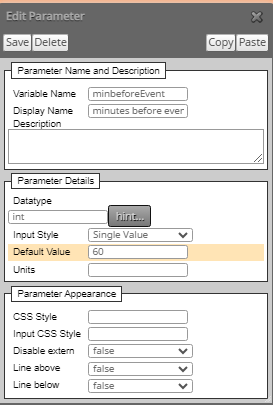
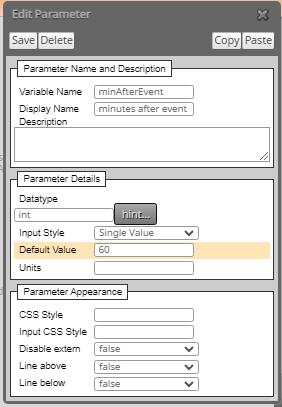
      int minbeforeEvent = 6024;
      int minAfterEvent = 60
      24;
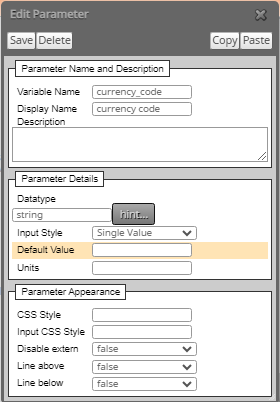
      string currency_code = "";
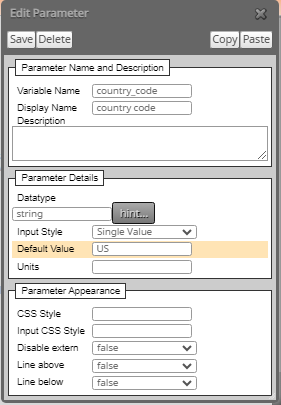
      string country_code=NULL; //--- country code (ISO 3166-1 Alpha-2)
      ENUM_CALENDAR_EVENT_IMPORTANCE min_event_importance = CALENDAR_IMPORTANCE_HIGH;
      */

      int FilteredEventsCount = 0;
      MqlCalendarValue values[];
      //--- set the boundaries of the interval we take the events from
      datetime date_from=TimeCurrent() - (60minbeforeEvent);
      datetime date_to=TimeCurrent() + (60
      minAfterEvent); // 0 means all known events, including the ones that have not occurred yet
      //Print(TimeToString(TimeCurrent(), TIME_DATE|TIME_SECONDS), " -> Searching from ", TimeToString(date_from, TIME_DATE|TIME_SECONDS), " to ", TimeToString(date_to,TIME_DATE|TIME_SECONDS));
      //--- request event history since the beginning to future time

      //if(verbose) Print("Begin Searching for events from " + TimeToString(date_from,TIME_DATE|TIME_SECONDS) + " to " + TimeToString(date_to,TIME_DATE|TIME_SECONDS) + " For Country " + country_code + ", currency " + currency_code );
      if(!CalendarValueHistory(values, date_from, 0, country_code, currency_code))
      {
      PrintFormat("Error! Failed to get events for country_code=(%s), currency=(%s)", country_code, currency_code);
      PrintFormat("Error code: %d", GetLastError());

      } else {
      //if(verbose) Print("Found some events");
      //PrintFormat("Received event values for country_code=(%s), currency=(%s) is (%d)", country_code, currency_code, ArraySize(values));
      int total=ArraySize(values);
      string commentString = "";
      for(int i=0; i<total; i++)
      {
      //if(values[i].impact_type < )
      MqlCalendarEvent event;
      ulong event_id=values[i].event_id;
      if(CalendarEventById(event_id,event))
      {
      if(((ENUM_CALENDAR_EVENT_IMPORTANCE)event.importance >= min_event_importance )
      && (values[i].time <= date_to)
      )
      {
      FilteredEventsCount++;

                 commentString = commentString + TimeToString(values[i].time,TIME_DATE|TIME_SECONDS) + " " + event.name + " " + EnumToString((ENUM_CALENDAR_EVENT_IMPORTANCE)event.importance ) + "\n";
                }
             }
       }
      

      commentString = "MQL5 returned " + FilteredEventsCount + " events from " + TimeToString(date_from,TIME_DATE|TIME_SECONDS) + " to " + TimeToString(date_to,TIME_DATE|TIME_SECONDS) + " For Country " + country_code + ", currency " + currency_code + "\n" + commentString;
      if(verbose) Comment(commentString);
      }
      if( FilteredEventsCount > 0 )
      {~next~}
      else
      {~inext~}

      BELOW, CODE TO INSERT IN GLOBAL VARIABLES:
      string event_info = "";

      AND, NEED CREAT THIS:
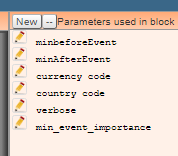
      6bad9574-7abd-4cfd-8ef7-368a01118425-image.png

      BELOW CONFIGURATIONS:
      c006a5b5-7efe-41f3-b3a4-267acfd3158c-image.png

      88d0f952-396c-4196-b1b3-aeb1b05206d7-image.png

      29a5e1b5-3ef1-4baa-b840-cf0b23b73eba-image.png

      a72c1d18-5785-41dc-a2bb-092f2aabc32c-image.png

      396f9b31-4609-4b30-85b7-4e9b6a01f796-image.png

      f238acaf-dc82-469f-8fc2-f24c848b87e8-image.png

      AND TO FINISH INSERT THIS BUTTON CREATED IN ON TICK OR ON TIMER
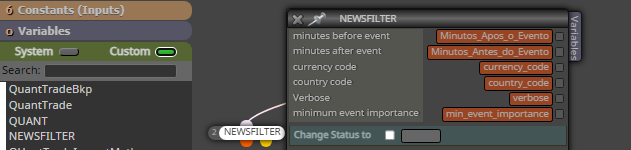
      b7ad49ce-b0e2-48d8-88a4-9af2efdb2148-image.png

      Hope this helps someone.

      posted in Tutorials by Users
      OntradingX
      OntradingX
    • RE: Recording sequentially after closing each order the amount they were closed.

      @jstap 5e1d5afc-16be-4657-9ddf-bc3e7cccab3c-image.png
      Acredito que eu consegui algo, vou testar e ver se atende ao que eu preciso, muito obrigado pela sua ajuda até o momento.

      posted in Questions & Answers
      OntradingX
      OntradingX
    • RE: Recording sequentially after closing each order the amount they were closed.

      @jstap but have project link in this post
      https://fxdreema.com/shared/O7P4ykyyc

      posted in Questions & Answers
      OntradingX
      OntradingX
    • RE: Recording sequentially after closing each order the amount they were closed.

      @jstap
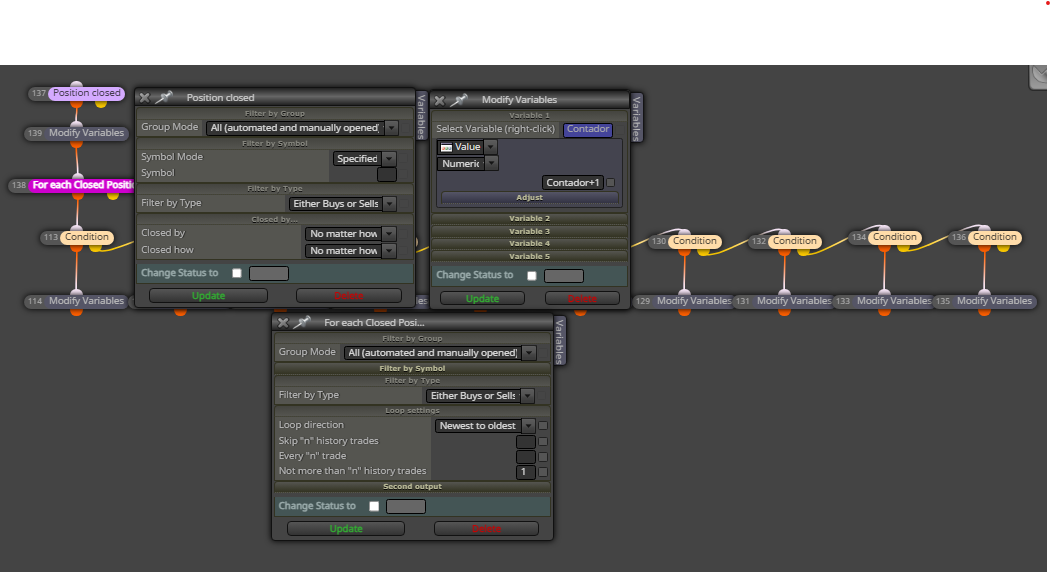
      I still don't understand what you're saying, without showing it with images it's hard for me to understand, I'll try to show what I'm doing:

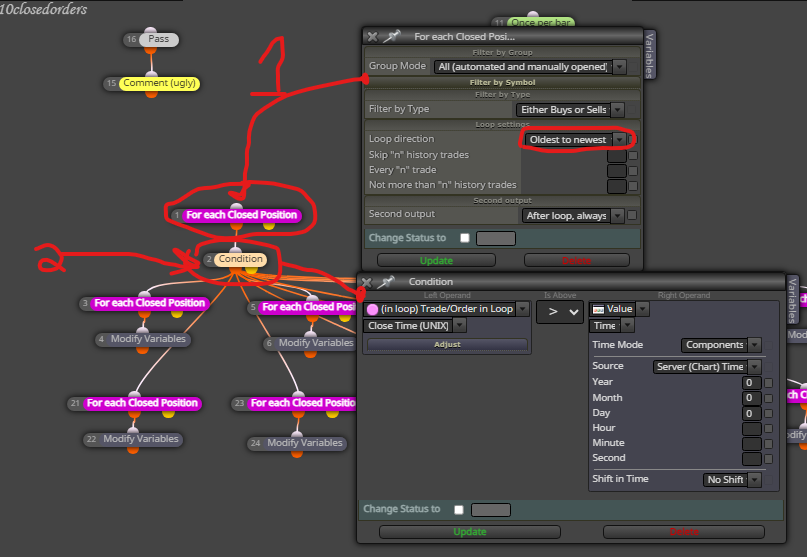
      1. Here below I am performing a Looping on all orders (already closed) in the pink block.
      2. I created a condition to (filter) only the orders that were (closed) on the day, month and year (current) so I defined 0, that is, I understand that every (new day) new values should be saved.
        c6c42e40-5f50-46ac-bfc4-b5e1a1dee834-image.png

      Then I call check each closed position in the sequence I want and save it in the variable.
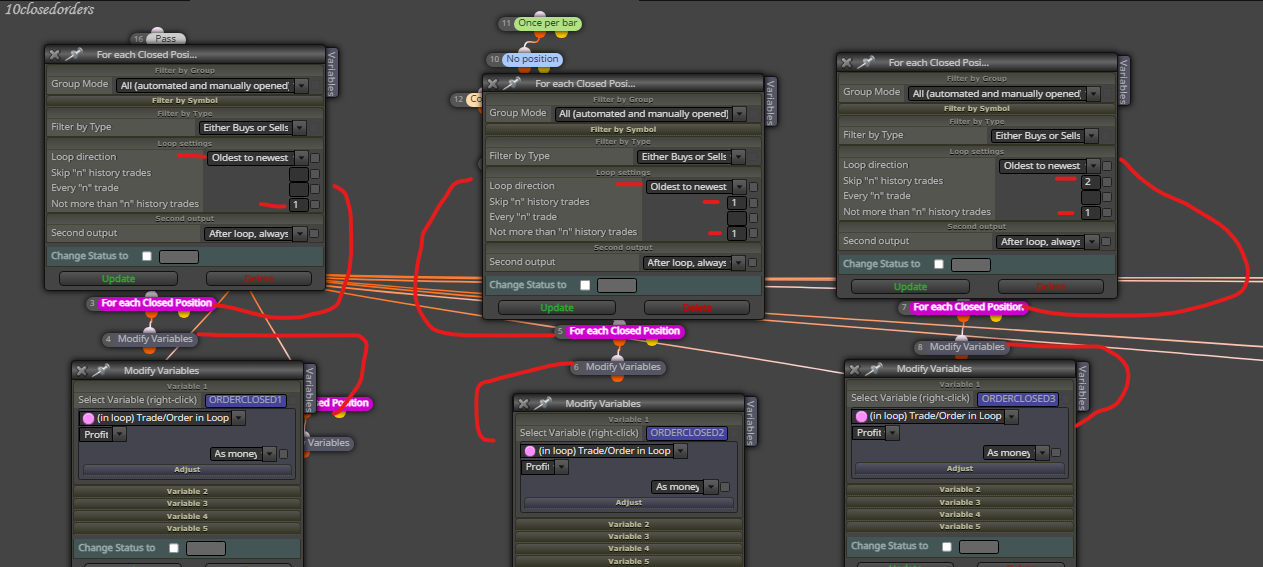
      In the first rule I meant:

      1. Loop only the (1) oldest order and write to the variable (ORDERCLOSED1).
      2. Loop only (1) oldest order (skip 1 order) and write to variable (ORDERCLOSED2).
      3. Loop only the (1) oldest order (skip 2 orders) and write to the variable (ORDERCLOSED3).

      I would like to know where am I going wrong, and how should I fix it?
      638347d2-1065-4bdb-9c2f-c306d0c531b0-image.png

      posted in Questions & Answers
      OntradingX
      OntradingX
    • RE: Recording sequentially after closing each order the amount they were closed.

      I don't understand, can you give me an example?
      I already tried to manipulate in all ways, maybe my logic is not correct.

      posted in Questions & Answers
      OntradingX
      OntradingX
    • RE: Recording sequentially after closing each order the amount they were closed.

      I don't understand, can you give me an example?
      I already tried to manipulate in all ways, maybe my logic is not correct.

      posted in Questions & Answers
      OntradingX
      OntradingX
    • RE: Recording sequentially after closing each order the amount they were closed.

      @l-andorrà
      exactly that. imagine i'm on day 1 and my EA starts trading. after finishing this trade 1, the result value of it must be recorded in variable 1. Then another trade opens, so this one to be closed must record its value in variable 2. It is And so on. Then day 2 started, my EA resets these variables to the value 0, and then the EA performs trade 1, when this trade 1 is closed, its value must be recorded in variable 1 and trade 2 happens and writes a new value, and so on for 10 trades.

      posted in Questions & Answers
      OntradingX
      OntradingX
    • Recording sequentially after closing each order the amount they were closed.

      I would like to just record the values of each order as each of them individually closes.
      A reset must always be done when a new day starts, changing all the values to 0 and filling in the values of the 10 new orders again.
      Can you help me finish this project?
      I noticed that I am recording from the first day, but as soon as the next day starts new orders are opened and the data is not being updated.

      https://fxdreema.com/shared/O7P4ykyyc

      posted in Questions & Answers
      OntradingX
      OntradingX
    • RE: Finally, News Filter for MT5 in 1 easy to use Block !!

      Work fine, but need adjusts.

      posted in Tutorials by Users
      OntradingX
      OntradingX
    • RE: URGENT Fxdreema too slow.

      @sktsec yess, i add 8.8.8.8 and 4.4.4.4 and work fine now.

      posted in Bug Reports
      OntradingX
      OntradingX
    • RE: URGENT Fxdreema too slow.

      @fxDreema friend, please disregard, I had a DNS problem at my internet provider, it has already been resolved by the provider and now everything is fine, thank you very much in advance.

      posted in Bug Reports
      OntradingX
      OntradingX
    • URGENT Fxdreema too slow.

      I noticed that for about 2 days fxdreema has been very slow.
      With small or large projects there is a huge delay to save .mq5 or .ex5 files. I can barely save my projects and their files locally in e

      Can you please urgently check if there is something going on with your provider or your system?
      @fxDreema

      posted in Bug Reports
      OntradingX
      OntradingX
    • 1
    • 2
    • 3
    • 4
    • 5
    • 6
    • 7
    • 8
    • 21
    • 22
    • 6 / 22