fxDreema

    • Register
    • Login
    • Search
    • Back to the main page
    • Categories
    • Recent
    • Tags
    • Popular
    • Search
    1. Home
    2. roar
    3. Best
    • Profile
    • Following 0
    • Followers 184
    • Topics 35
    • Posts 2406
    • Best 422
    • Controversial 6
    • Groups 0

    Best posts made by roar

    • RE: Poor countries, poor people

      @kbt I doubt the purpose of this post is to specifically talk about Iran. The fact is that the average person in country a has more purchase power than the average person in country b (and fxdreema or any other business cant do much about this inequality).

      Anyway 30% of Iranian households live in poverty, so it is not very outrageous to call it a poor country in general, in my opinion.

      posted in General Discussions
      roar
      roar
    • RE: Having trouble creating a MT5 EA even after converting it from MT4.

      Haha awesome!

      posted in Questions & Answers
      roar
      roar
    • RE: 4k Monitor - Comment blocks Values overlay on screen

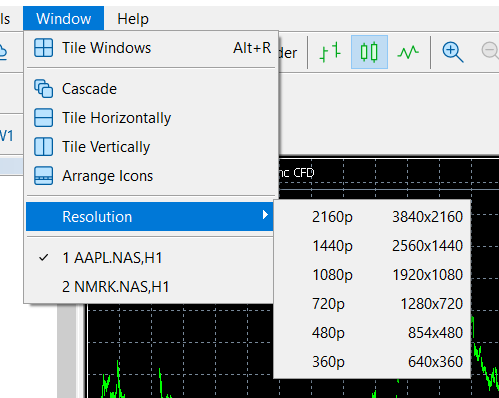
      It seems MT5 got a resolution selection in the latest update. I suppose this helps with objects

      image.png

      posted in Bug Reports
      roar
      roar
    • RE: Mql5 EA build

      I can't test the .ex5 right now, got an optimization running..
      Please use the windows snipping tool to put a picture, or share a copy of the project:
      0_1549307479441_a6e39f48-ce0f-4a15-9b4d-9a220d05d46b-image.png

      posted in Questions & Answers
      roar
      roar
    • RE: String conversion from Double not working correctly

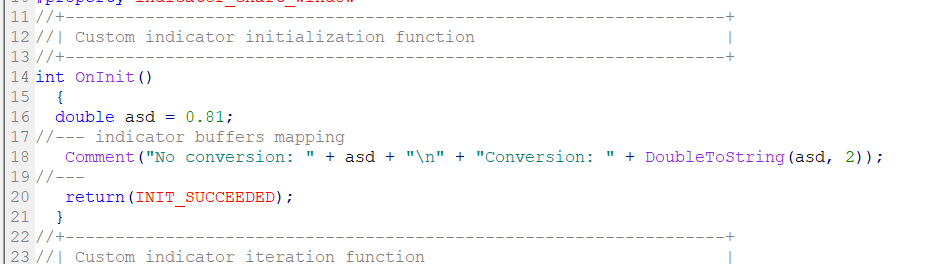
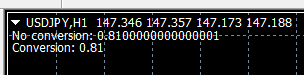
      @MMBInvest DoubleToString() always works, I dont know what else to say. Here is an example you can actually reproduce, maybe it helps.
      testtt.mq4
      5c8ffb4e-8ff6-435f-8b18-d6a3762f10a1-image.png 5a793df8-85be-4292-9346-4282faa817b0-image.png

      posted in Bug Reports
      roar
      roar
    • RE: Mql5 EA build

      @spicynote
      This will need some fixing. Remember that the ea algorithm runs on every new tick (as we are "on Tick").
      Now it checks every tick if the candle is above MA 60, and if that is TRUE, then it buys.
      It will not open new buys (even if price is above MA) before we wait 2 bars, that's what the "every n bars" does.
      You shouldn't put any closing conditions after the opening condition - that means that you want to close the trade on the same second you open it.

      I'll make a working example in a minute

      posted in Questions & Answers
      roar
      roar
    • RE: Time source wrong calculation

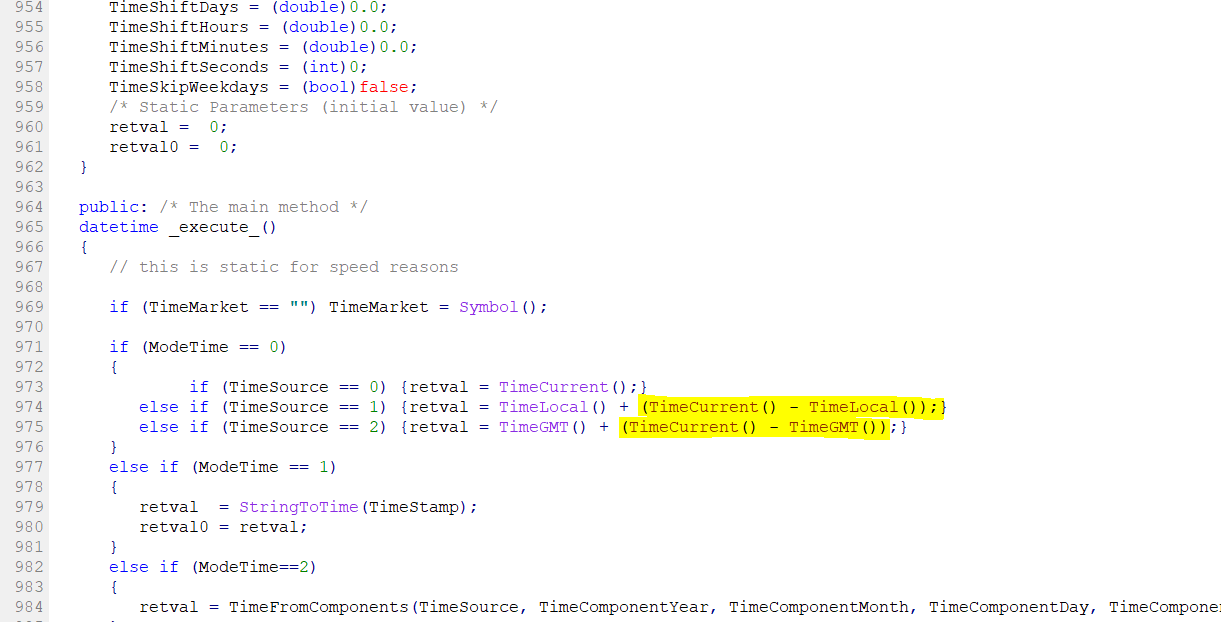
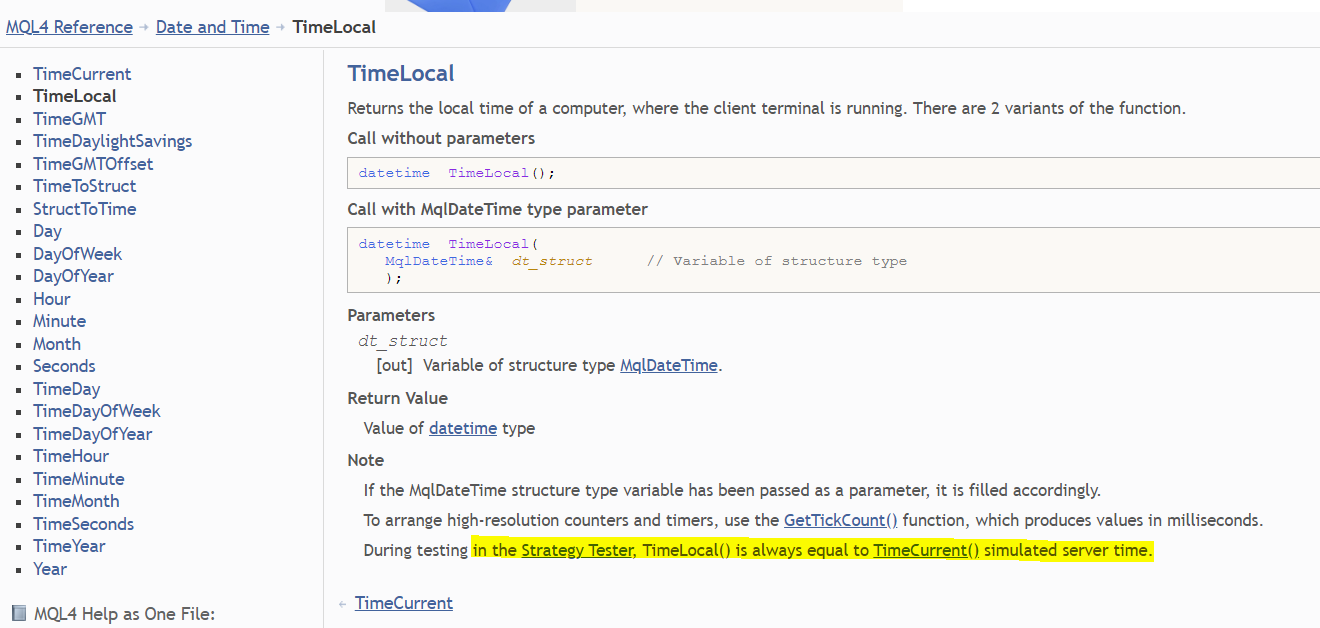
      Looking at the source, the time model seems to use TimeLocal() and TimeGMT() but then immediately remove the difference to server time - I wonder what's up with that @fxDreema đŸ˜„

      image.png


      Also a good thing to remember:

      image.png

      posted in Bug Reports
      roar
      roar
    • RE: Mql5 EA build

      @spicynote
      Here: https://fxdreema.com/shared/Y3lUXgVrb
      Moving backwards in time is best done with the candle ID.
      ID 0 = current, updating candle
      ID 1 = latest completed candle
      ID 2 = 2nd completed candle
      etc.

      Connecting blocks vertically means "AND".
      I connected 2 blocks with condition: "candle close is above 60 MA", with different candle IDs, so the combination reads as "latest candle is above 60 MA, AND the one before it is also above 60 MA"

      posted in Questions & Answers
      roar
      roar
    • RE: Compilation errors when using indicators with Multi Time Frame.

      @PhiLykia does the custom indicator have variable names such as "c" or "v"? Those may create the bug. You could try renaming the variables of your indicator.

      I do agree these kinds of bugs should be fixed rather than finding such workarounds.

      posted in Bug Reports
      roar
      roar
    • RE: Candle size

      Use the block "modify variables" and from there select candle -> candle total pips

      posted in Questions & Answers
      roar
      roar
    • RE: Bug with fractals indicator

      @l-andorrĂ  fractal indicator has a value for every candle, even if there is no arrow visible. That value will be 0, and naturally 0 is always below candle high.

      This is why the correct way to use fractal is simply with condition:
      fractal up/down != 0

      posted in Bug Reports
      roar
      roar
    • RE: saving lot size in variable

      @jennifer
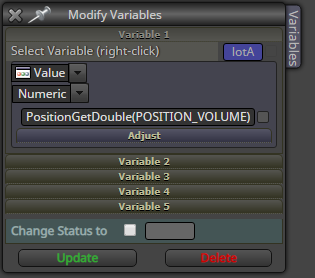
      You can put custom code pretty much everywhere in fxdreema, like this for example
      0_1550075949968_11d95549-b5ad-4c54-9613-50b06213360d-image.png

      posted in Questions & Answers
      roar
      roar
    • RE: Bug with DoubleToString

      @gsmtricks Just replace it to the function:
      MathFloor(Rate * 100) / 100

      Hope it works!

      posted in Bug Reports
      roar
      roar
    • RE: how i do that in fxdreema in equity ?

      @moon
      We update the PreviousBalance variable at the point when there is no trades.
      When there are some trades, compare the current equity to the previous balance. If it is 100 units bigger, close trades

      posted in Questions & Answers
      roar
      roar
    • RE: I'm having a compilation errors

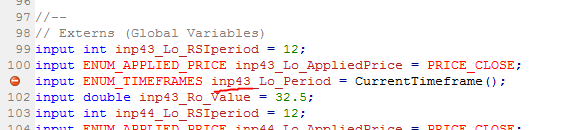
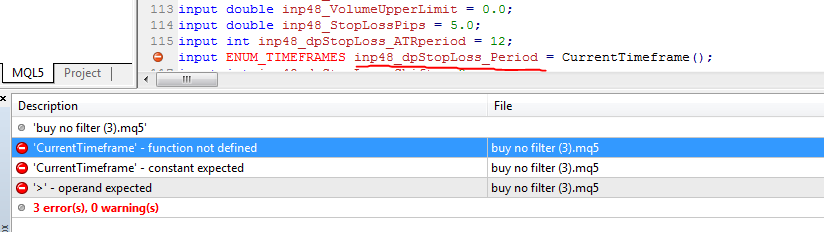
      How to troubleshoot an error like this:
      0_1551374448297_492f6680-83c2-4ba4-b55f-128c2fdeafcb-image.png
      Hmm, inp43 = problem is block 43, left operand, something about timeframes...
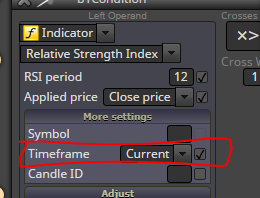
      Lets check the block in fxdreema:
      0_1551374527709_e877c58b-98f5-448a-9b63-06c7f2d1b54c-image.png

      Hmm, maybe I should untick the timeframe box:
      0_1551374572432_1fa1e449-acfe-4122-88a3-2a80cc35a98c-image.png

      voilĂ , no error anymore! To the next error ->

      posted in Questions & Answers
      roar
      roar
    • RE: I'm having a compilation errors

      0_1551374682739_45d37db8-ca27-43d0-8c20-2ec126d99af9-image.png

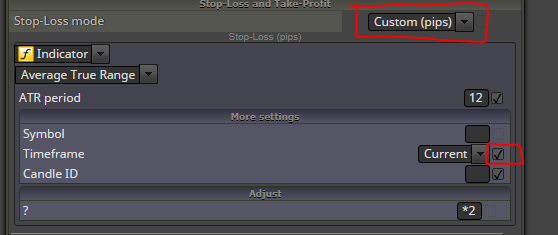
      This error can be more confusing, as the stop-loss doesnt seem to use any timeframe:
      0_1551374703277_d599c54e-980e-4f63-bd06-0a661fa1bec8-image.png

      But it is hiding in the drop-down menu, "Custom (pips)". Uncheck that timeframe box. No error!
      0_1551374885435_03c1635f-427f-4a00-a232-53f4501a6764-image.png

      posted in Questions & Answers
      roar
      roar
    • RE: How to make that Close Condition !

      @l-andorrĂ  I wish I was a real programmer lol. I don't even know the basics of mql.
      I just copy from mql4 articles, try and fail and try again until I get my result.
      Thats the beauty of this program, you can teach yourself

      posted in Questions & Answers
      roar
      roar
    • RE: Break even ?

      yes, with 2 blocks đŸ˜„

      posted in Questions & Answers
      roar
      roar
    • RE: Break even ?

      @zackry It is to filter how far your trade is from the break even point.

      If you set 0, the break even will always be set if your trade is on profit.
      If you set 10, the SL will move to break even only if youre 10 (or more) pips on profit

      posted in Questions & Answers
      roar
      roar
    • RE: Break even ?

      @zackry ok, just set it to 0, so the amount of profit will not matter.

      You can't set a breakeven on a losing trade

      posted in Questions & Answers
      roar
      roar
    • 1
    • 2
    • 7
    • 8
    • 9
    • 10
    • 11
    • 21
    • 22
    • 9 / 22