I don't think "Block 1" and "block 2" work. You'll need to name them first and second or simply 1, 2
T
Posts made by TitanGeorge
-
RE: Help with Pending ordersposted in Questions & Answers
-
RE: Help with Pending ordersposted in Questions & Answers
Open your terminal and go to the journal tab. There you will see the errors. I think it has to do with your brokers minimum pending order distance requirement.
-
RE: self updating/refreshing grid, compare two groups of tradesposted in Questions & Answers
@fxdreema Your logic is correct. If ramsay wanted an auto refreshing grid, two logic trees with Opposite distance (up 10 and down 10). Were needed. Pending trade count = 0 Then Buy Pending order +10 pips and vice versa.
It's all that was needed.
-
RE: Refill pending orders in gridposted in Questions & Answers
How did it go with your Grid ea? You have a profitable ea in your hands. Were you successful or did you move on to a different project?
-
RE: Run EA in addition to existing manual opened trades ?!?posted in General Discussions
@kymatatrading You're welcome! Wish you the best
-
RE: what is the best option for candle body or wick for (candle 0)?posted in Questions & Answers
@khalids222 Wish you the best in your ea
-
RE: what is the best option for candle body or wick for (candle 0)?posted in Questions & Answers
You shouldn't worry about tick volume. Reason is that ticks are UP and DOWN PER TICK. So a 1 pip candle can have 1000ticks and another 1pip candle can have 2000ticks.
They are both the same size but the tick volume will be different depending on what was happening.
As for Body Size and Wick to Wick Size. That depends on the strategy.
Just test both options and see which one works better or what Pros and Cons each one has.
I'm guessing your strategy will use the Body and the Closing price format.
-
RE: One Trade Per Bar on Condition - Failing.posted in Questions & Answers
Glad you got it sorted out.
-
RE: what is the best option for candle body or wick for (candle 0)?posted in Questions & Answers
You'll need to look at your indicator and see what price calculation it uses. I would assume that it uses CLOSE information. To check, you can use one option at a time, run it in strategy tester, and then go back into the visual chart and see if it crossed correctly by opening the correct trade.
-
RE: What Makes a Good Strategy?posted in General Discussions
No luck in automating it but I did find a way to make trading easier using buttons. The trade will open depending on risk. So a 2 pip stop loss and a 20 pip stop loss, all the same risk. Difference in reward as I can increase my lot size depending on the stop.
-
RE: how can i limitate the maximum open tradeposted in Questions & Answers
Only 1 trade PER EVENT?
Use the "No Trade" block. If you have no trade, then your conditions go off for a BUY, it buys until it closes it out or you close it out yourself. If you use the default "No Trade" block, it will prevent any sells from opening as well.
This block will also pick up manually open trades. If you wish to trade manually as well, you'll need to great a GROUP for the ea
-
RE: Run EA in addition to existing manual opened trades ?!?posted in General Discussions
You are correct! That way, if there isn't a GROUP 1 BUY or GROUP 1 SELL, then the ea ONLY opens either a buy or a sell when the condition is met regardless if you have a MANUAL trade OPEN.
If possible, depending on the way you think, you can group all automated trades into 1 group. I made a mistake on the Sells comment. Its good to put a comment if you wish to see what type of trade it was.
See the pictures. Regardless, your way will work as well.
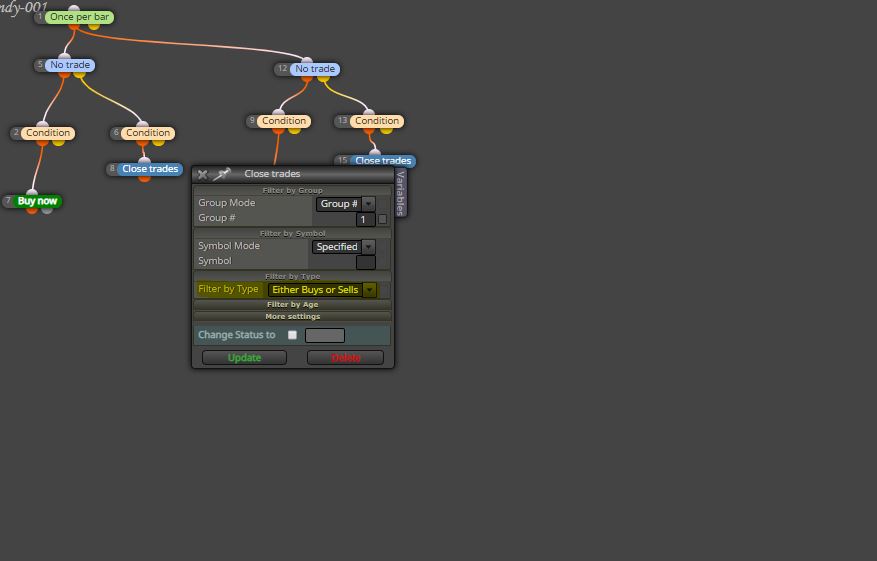 ![0_1582991503476_Option2.JPG]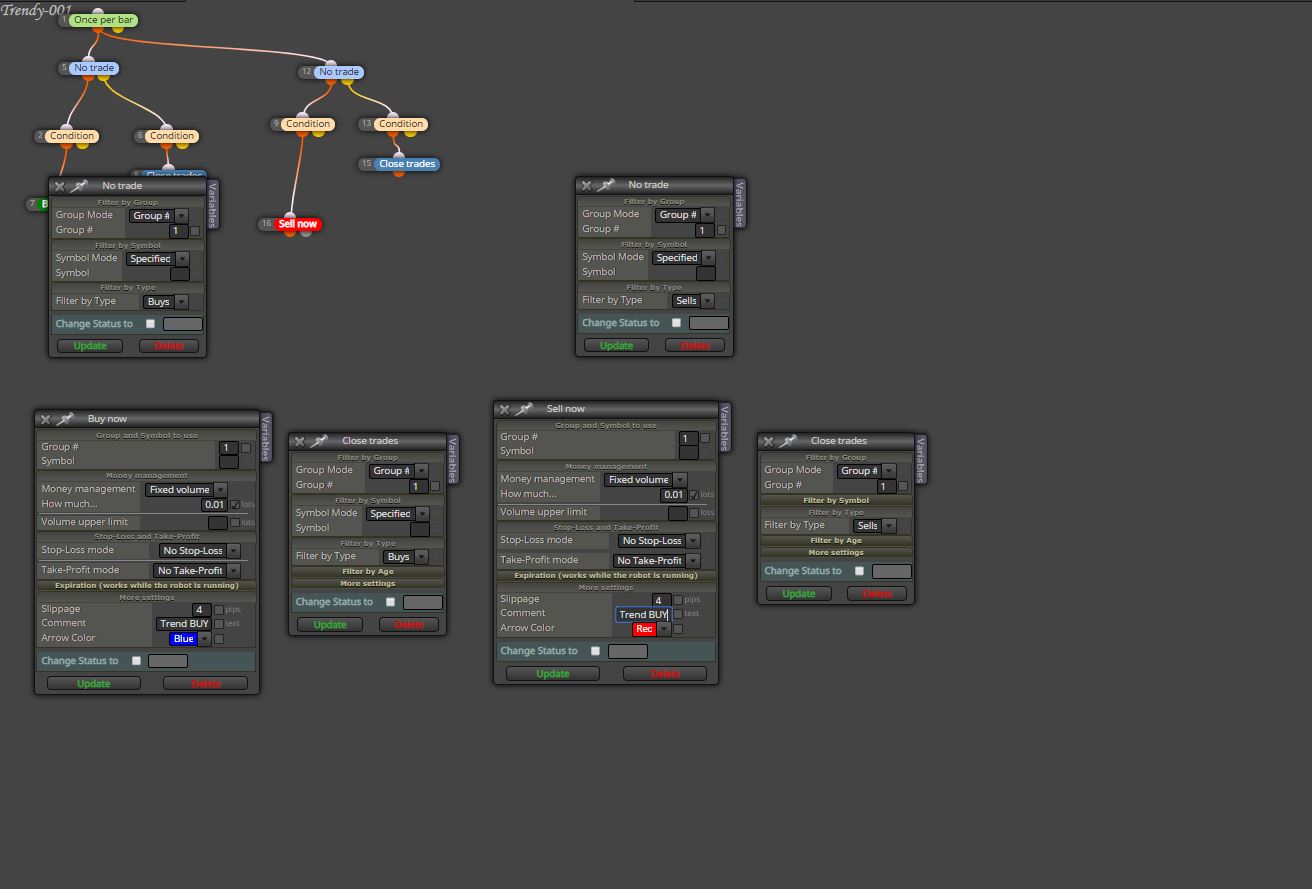
-
RE: One Trade Per Bar on Condition - Failing.posted in Questions & Answers
You need to use the conditions block.
Left Parameter: "Market Properties" Then choose between "Ask, Mid, Bid"
Condition is "CROSS ABOVE" or "CROSS BELOW"
Right Parameter is Candle then Candle High and make sure its candle ID 1.
https://fxdreema.com/shared/cQJtiv7G
Do the same but opposite for the sell condition.
I personally use the MID for these types of crosses due to spreads but you're more experienced in trading so it's at your discretion.
Keep in mind, that this will BUY or SELL every time price crosses those points.
Make sure you have the correct "Once per Bar" or "Check Trade Count" blocks attached AFTER these.
-
RE: Run EA in addition to existing manual opened trades ?!?posted in General Discussions
You need to SPECIFY on your "No Trade" block.
Change Group # to "Manually Opened" and make sure everything you want the EA to do when you manually open a trade, is connected correctly to this block.
-
RE: Choppy, sideways marketsposted in Questions & Answers
Alright pan, I digested your information. I like it. If I'm able to find a way to calculate pullbacks and use that number for continuation trades, then I'll PM you.
Two parts to this...Create a logic tree that detects a pullback and another on that detects a greater than previous pullbacks...I have an idea. Currently I'm using objects to show low and high. I can get the distance between this and compare with current data.
Overall, I'm pleased with your information and thank you for it.
-
RE: Choppy, sideways marketsposted in Questions & Answers
This is actually a good strategy! Price tends to breakout of previous lows and highs a good percentage of the time.
Where did you learn/observe this?
-
RE: horizontal line on char buy and sell orderes doesnt workposted in Questions & Answers
Nice project, has lots of interesting variables.
"No horizontal line drawn on the chart [counts] as a buy or sell order."
Based on the project title, I'm assuming you will manually add a horizontal line on your chart. This line will be called "buy"
If correct, you will have huge problems.First, on EVERY TICK, every time the ASK is above the line, it will endlessly create pending orders in a grid. You need to fix that by putting a filter. "Once a day" "Once every bar" "Counter: Pass Once"
Same for SELLSAs for "no horizontal line drawn" counts as a buy or sell order. You don't seem to have any condition blocks that match your description.
Your EA will ONLY work once a line named "buy" is placed on the chart.
On your "on chart" it looks like you're trying to delete the line. Not sure if it will work, simply use the "delete object" block and put in the Name/Prefix section "buy"
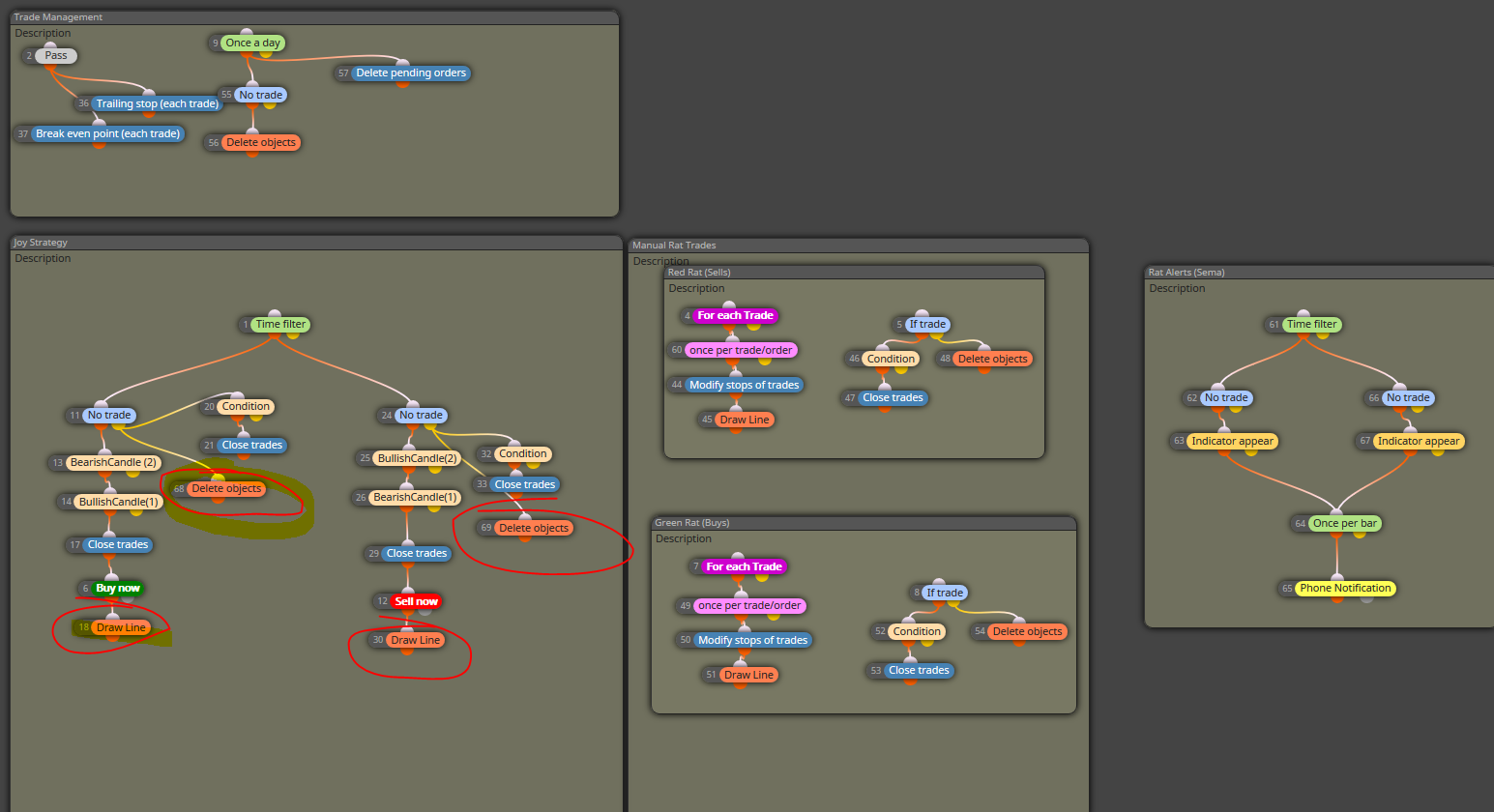
Quick Tip. When working with multiple rules, try to make it easier for you to understand by creating areas. See attached. I circled the line and Delete object blocks because I think that's what you're trying to achieve.