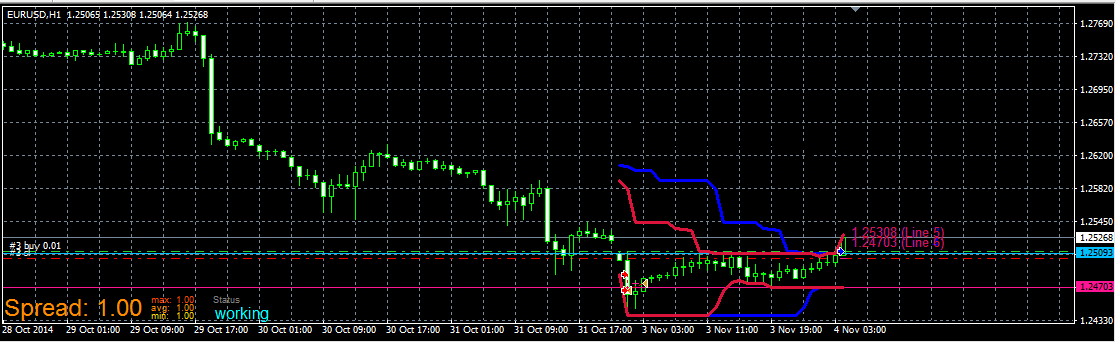
all you described can be easily done, behind this closing can be trailing (and ofc. missing block for filtering - once per bar - daily if you will one trade per daily candle - placed before block for opening trade), look here (trailing is off, you can turn on if you will) :
https://fxdreema.com/shared/f3F0AWBF
it is also example how to make closing on opposite situation with period 10 for highest/lowest ...
M
Posts made by miro1360
-
RE: Buying/Selling at the highest/lowest price of the last 21 daysposted in Questions & Answers
-
RE: Help with bucket of trades/multiple order profit(fixed) a new questionposted in Questions & Answers
this block is working like Check, next action you need connect after block (closing trades, and other what you will do) ... in block are filters, you can set only for buy trades or only for sell trades, group, market, and also trades with some minimal amount of profit (for MT4), next you select if you will compare pips or money ...
EA stops for n minutes, try to working with blocks in Time Filters, I recommend you first try how are this blocks working (one after another, you can observe behavior when you connect something after this block, like Trace, or creating objects on candles) ...
-
RE: Help with bucket of trades/multiple order profit(fixed) a new questionposted in Questions & Answers
have you tried block Check profit (unrealized)?
-
RE: Need Help with an EAposted in Questions & Answers
hi, from my view, 1 day training and than going to make more complex EA is not enough, but how help you ... firstly try goes through all available stuffs here, that is help:
https://fxdreema.com/help
examples: https://fxdreema.com/examples
try to figure out how are stuff working, which values are compared, try to look for some tutorials:
https://fxdreema.com/forum/category/4/Tutorials
... try to find in forum if somebody else is not asking for psar indicator and how to work ...
try make easy things as first and try every thing on chart with visual tester (also use block trace to trace values) ... when you are complet with easy stuff try to add something and look what it is doing or if it is working
... look also for my answers, sometime I share working examples ...
and also share what you are trying to do, when you share, somebody here tell you what you are doing wrong
-
RE: Help me set entry from this custom indicator?posted in General Discussions
for this indicator I see fibo levels stored in buffers, that means you can use buffers, check tutorial 06 how to import indicator into My indicators or help section where is also describtion about my indicators:
https://fxdreema.com/help/working-with/custom-indicators
https://fxdreema.com/forum/topic/4208/tutorial-06-my-indicators-in-fxdreema -
RE: how to write this indicator to EAposted in Questions & Answers
Hi, I looked at your indicator and buffers are ok, they must working with fxdreema,
but arrows are not in buffers, they are only as Objects on the chart, in that case you need working with objects on chart (which is not easy) or buffers logic because object appears on some buffers combination, that means when is there arrow some combination of buffers are meet. I sugest you working with buffers.
Dont forget import your indicator into My indicators using this tutorial or help:
https://fxdreema.com/forum/topic/4208/tutorial-06-my-indicators-in-fxdreema
https://fxdreema.com/help/working-with/custom-indicatorsHere is my goodness to help you and this is working example with your indicator:
https://fxdreema.com/shared/mkwESX6Tc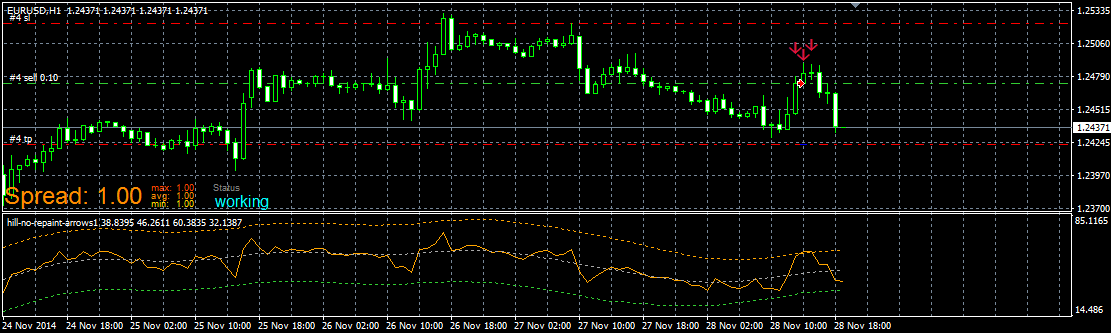
-
example: Price PullBack EAposted in Tutorials by Users
Notice: This is not proved EA and is not prepared for real trading. Test it only with demo account.
All you are doing is your own responsibility, not mine.How to make price PullBack EA.
It is a lot of meanings what price PullBack can be, here is one of them based on 3 exponential moving averages:
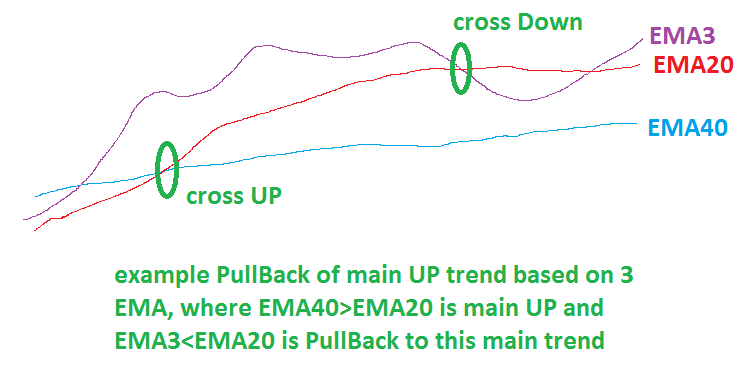
and here is my example of EA in fxDreema how to make this one with more additional settings:
https://fxdreema.com/shared/1IpxvLruc
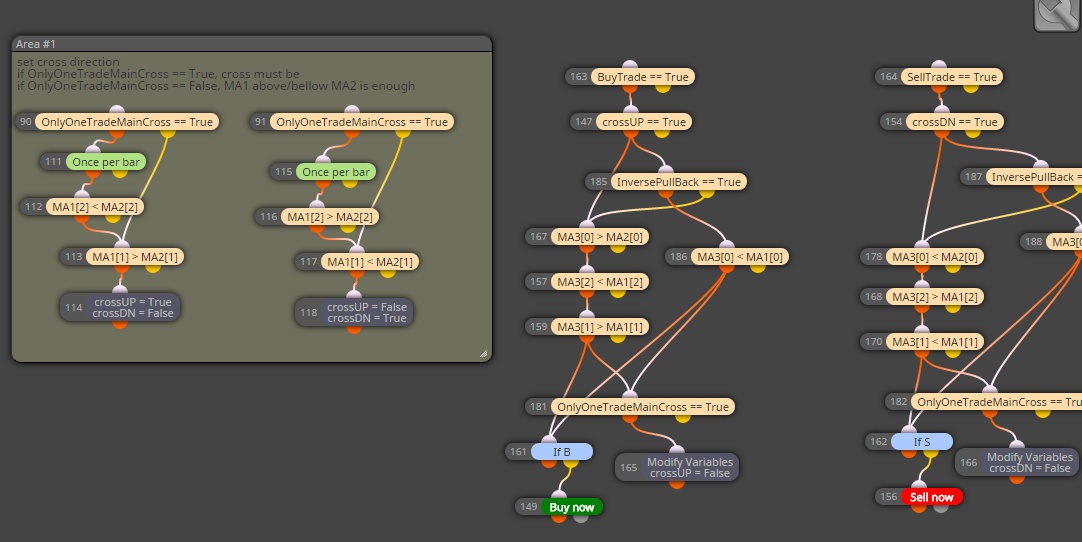
I added few next options, like "OnlyOneTradeMainCross" if true, only one trade is taken on main cross and after that wait for next main cross
EMA20 x> EMA40 for main UP (buy)
EMA20 x<EMA40 for main DN (sell)
if OnlyOneTradeMainCross is false, more trades are opened on one cross and for simplify cross is not needed, only condition EMA20>EMA40(buy), or EMA20<EMA40(sell)
next option is InversePullBack, this option is probably bad named, but when it is false it wait for cross: EMA3 x> EMA20 and next condition EMA3>EMA40 for buy
when it is true pullback for buy is when EMA3<EMA20
With "BuyTrade" or "SellTrade" selected as false can be trading buy/sell disabled.
These additional options shows you, how to make more alternatives for EA easily switched in EA settings.Default EA settings for above described strategy:
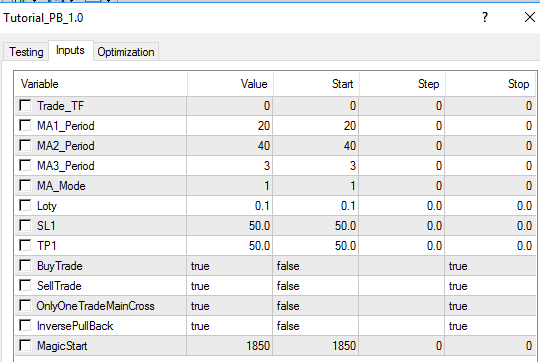
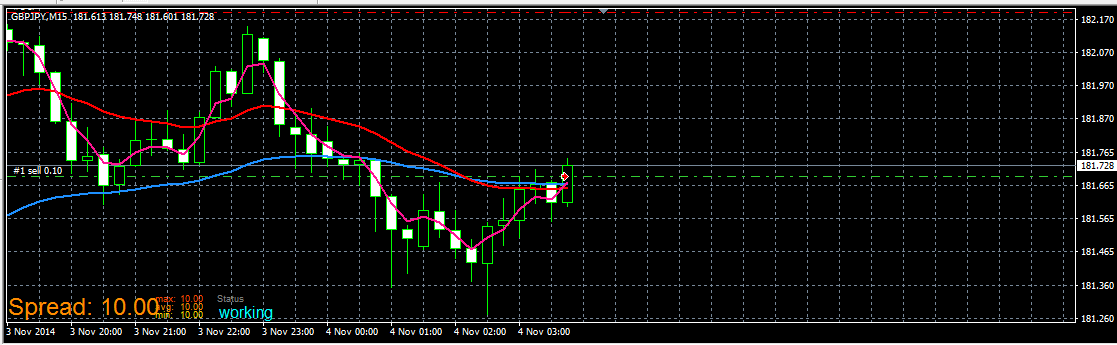
Demo trades from EA:
start of Sell
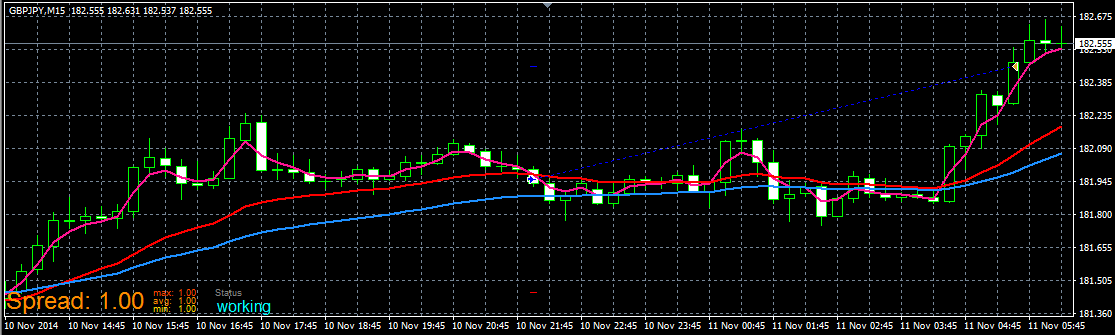
completed Buy:
In other tutorials you can find how to work with buttons. Using buttons you can create this EA for better manual control.
have fun!
-
RE: Creating a drop down menu?posted in General Discussions
in my opinion this can be made only manually in code using enum structure
https://docs.mql4.com/basis/types/integer/enumerationI am not sure if you will do that (maybe exists something easier) ... but this can be way:
in top of code you place something like this (manually):
enum USE_INDICATOR
{
movingAverage,
rsi,
macd,
adx
};in input parameters (again manually):
input USE_INDICATOR useIndicator = movingAverage;after that you can make case switch (manually):
switch(useIndicator)
{
case 1: { //code and functions for calling rsi }; break;
case 2: { //code and functions for calling macd }; break;
case 3: { //code and functions for calling adx }; break;
default: { //code and functions for calling moving average }; break;
}
........
........you see how crazy it can be, but you can try ...
I think, it is better creating few separated EAs with fixed indicators in fxdreema, give for each EA right name to demark and start with optimalization for each EA, results into excel and there you can make own form of sorting and comparison results from optimalization .... -
RE: closing trades after x period IF they're in lossposted in Questions & Answers
generate mq code and import it to your projects from this link:
https://fxdreema.com/shared/1xokGRsgc
dont forget click between sections "on Tick" and "on Trade", both are used
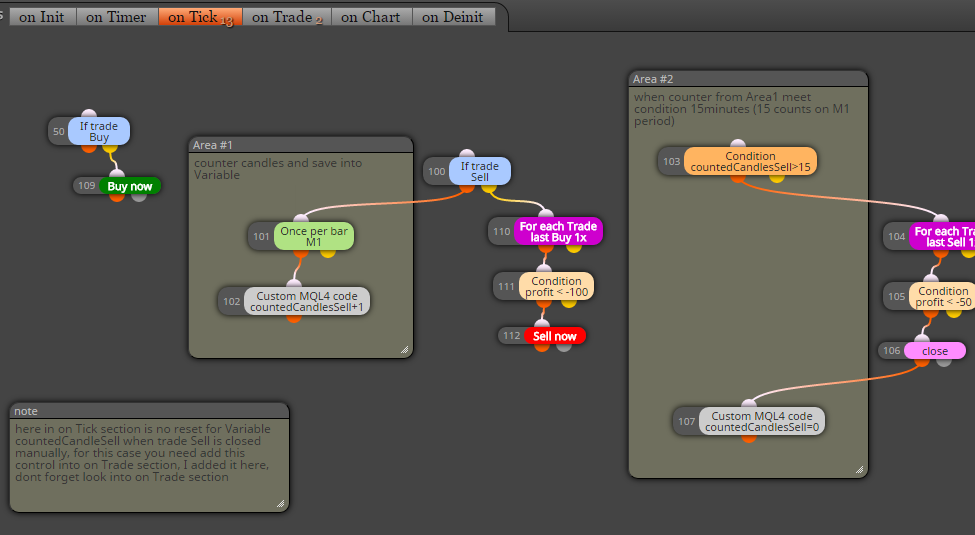
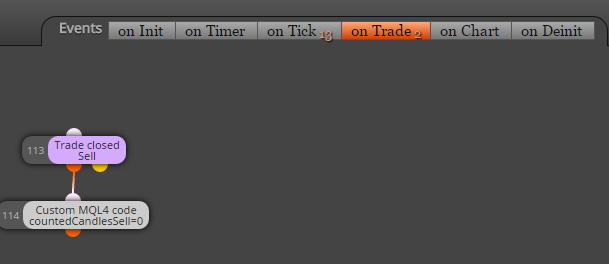
also 1 variable:
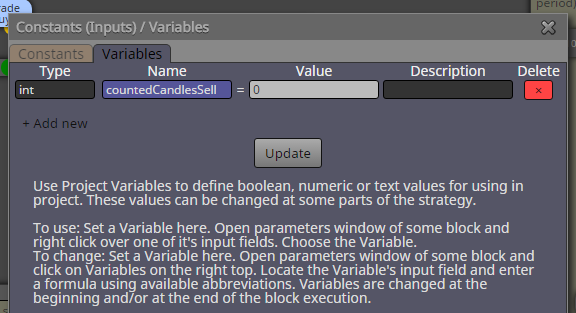
for opposite situation create another one variable ...hope you understand it

-
RE: HOW CAN DO İT? HELP PLEASEposted in Questions & Answers
check tutorials about that, there is example how to work with this kind of indicators
https://fxdreema.com/forum/category/4/Tutorials
tutorial 07 -
RE: Buy Now/Sell Now - Slippage optionposted in Questions & Answers
that is question more to you, what will you or your system accept (in case if your broker offer slippage control)
because if you will enter trade at high spread (this can you also filter, when spread is more than you will have, EA must not enter trade), but if you will enter at high spread, if you and your system can accept high slippage (in other words, you can accept your trade on other price as requester offseted with some amount of pips depends on actual slippage) than you can have slippage also 100 (that is 100 pips :D), but if you will have slippage maximal 10, you enter this number ....in most cases slippage 4-10 is satisfactory
note, a lot of brokers have not this slippage option, so only way how to detect potentially slippage is through spread (if your broker offer for EU spread 0.5-1.2 in time with normal volatility, and suddenly is spread >2, this can detect high volatililty and your EA dont enter)
-
RE: Buy Now/Sell Now - Slippage optionposted in Questions & Answers
slippage is not spread, spread is spread ...
slippage is something what is broker not guaranted to you, it happens in ECN accounts (also normal accounts), when big volatility is here (news) and you place Sell on Bid price 1.1000 (when is spread 15, for this example Ask is 1.1015), your order must not be filled on this Bid price, can be filled on 1.1008 or 1.0992 (when slippage is +-8) .... your Buy order is normally filled at 1.1015 (spread 15) but when is slippage +8, will be filled at 1.1023 ...
back to your question, when you give into EA slippage, 4,10,20, all depends on your broker if he is guaranted slippage, when is, your order will not be filled if slippage from broker is > your in EA, but when is not guaranting, order will be filled on slippaged price and doesnt matter what you have in EA ... -
RE: What is the correct way to extend Stoploss?posted in Questions & Answers
I dont see here problem with extend stops, look here:
(I used onTimer section for blocks, but the same happen with on Chart, dont be confused)https://fxdreema.com/shared/KQV8gHcfd
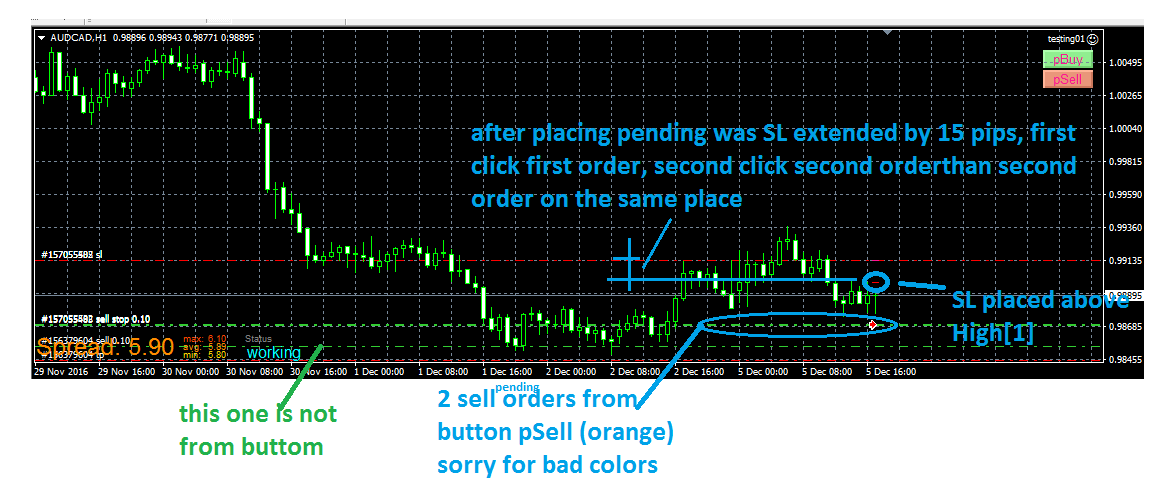
-
RE: What is the correct way to extend Stoploss?posted in Questions & Answers
before block extend stops try place another block: For each Pending Order and apply some filters in this block (like Not more than "n" orders: 1)
-
Tutorial 07 - Read prices from indicator objectsposted in Tutorials by Users
We are going read values from Objects on the chart which are controlled by indicator, not values from buffers, that means, we dont need indicator in My Indicators because we are not going work with indicator directly.
Indicator must be inserted into chart manually (into same chart with EA).here is indicator (note, is renamed, you can rename it as you wish)
0_1480901745242_Shved Supply and Demand (e600) length.ex4and here is shared link to this strategy:
https://fxdreema.com/shared/JyxzKfdwdnow look how is this indicator working:
-
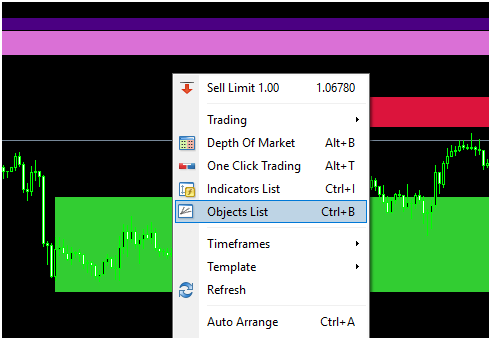
is ploting dynamic zones:
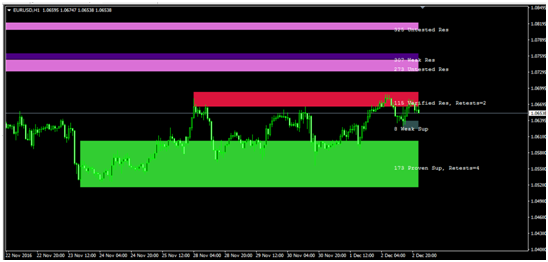
-
these zones are not from buffers, but from objects, so look how they are named:
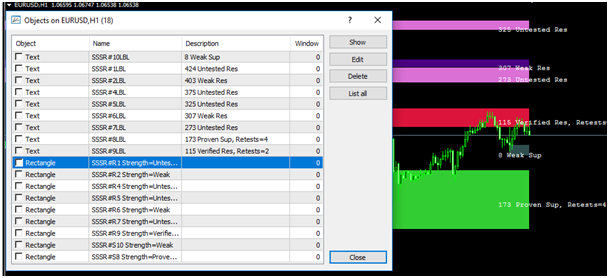
See, Rectangle type with name begins as "SSSR" and than some incrementation with "R" or "S" and next info like "Weak", "Proven" ...
Our strategy can be (you can create another):
- when candle 1 closed inside zone, we leave EA waiting for next conditions
- when price go outside (next candle 1 closed outside) zone Up, EA open Buy, when outside zone Dn, EA open Sell
- zone width must be at least 1xATR
- SL and TP is some multiplicator from ATR indicator
- Lot size is risk percento from balance depending on SL
First we need 2 blocks which are selecting objects (rectangles) based on criteria:
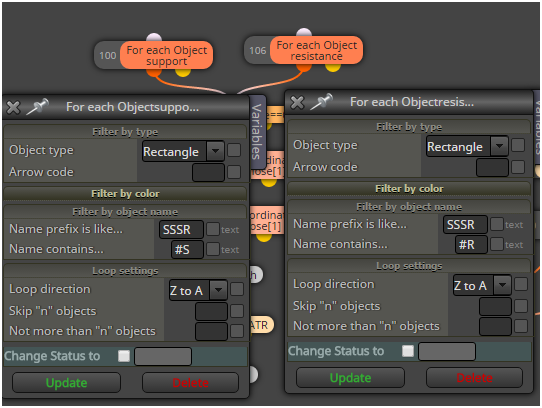
next is switch which control if was price inside rectangle before and if EA is waiting for trade
after this are blocks which are working with selected rectangles
these blocks make some comparison with candle price and variable blocks save price from selected object into variables priceUp and price Dn for next comparison:
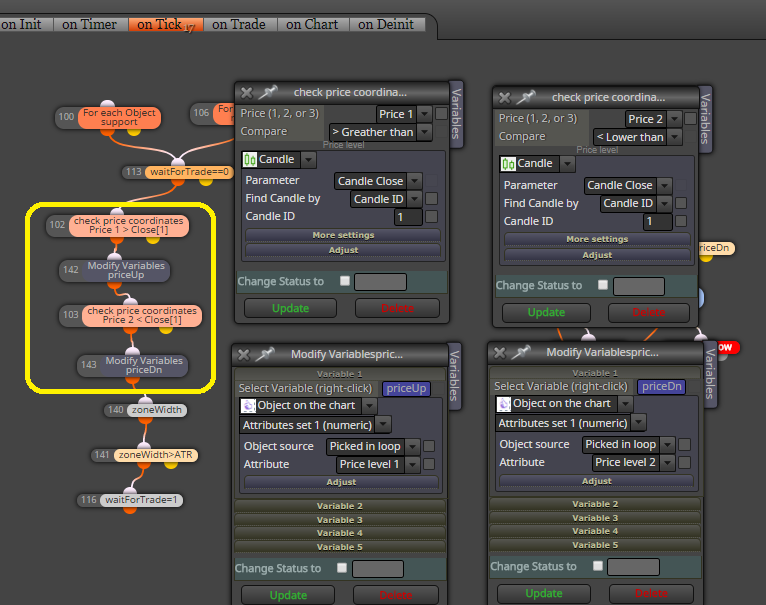
here are all blocks together needed for this strategy:
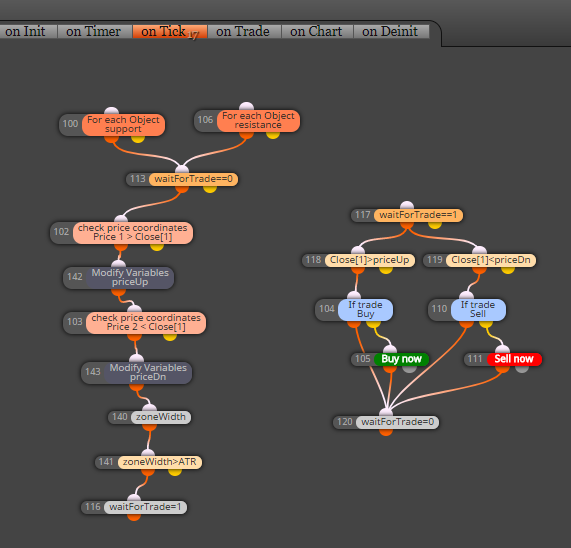
and this is result:
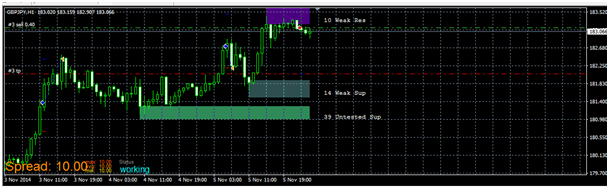
note: this is not profitable EA and is not for your real account, this tutorial shows only way, how to work with object from some indicators
note:
- with this way you can working with any object on the chart, also with own objects placed manually
- better if you give them name in chart and for selecting object you use block: "Select Object by Name"
- or you can read or compare values from objects also with other blocks:

that is all ...
-
-
Tutorial 06 - My Indicators in fxDreemaposted in Tutorials by Users
1.) Import with mq file:
Here I show you, how to add custom indicator into My Indicators in fxdreema and how to use this indicator in project. You can take any indicator, for this tutorial I created own indicator based on Trader Divergence Index. It are few moving averages over RSI and my own enhancement channel based on Standard Deviation multiplicator over market line (third MA).
First you need is know, how indicator is working and which values are in buffers.
For this, place indicator into chart and see:
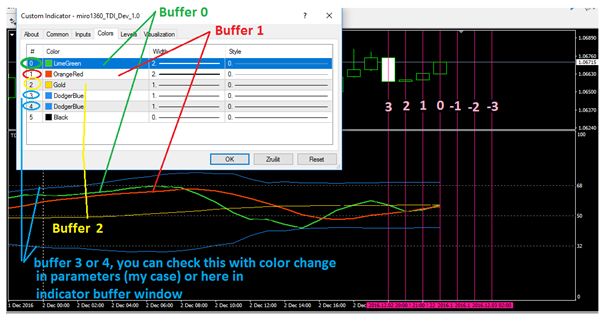
On that picture observe indicator buffers in settings window how they are numbered (0,1,2,3,4, ...), these buffer indexes are important numbers for you.
In builder click on My indicators - Add custom indicator - Select, and find your mq file with indicator and ok:
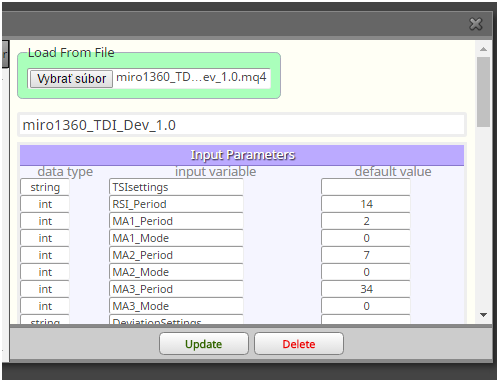
.
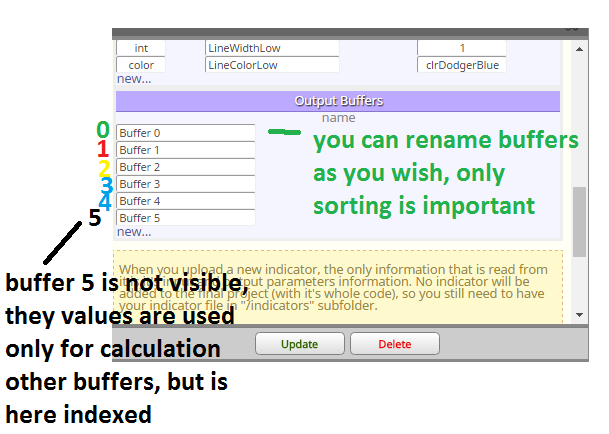
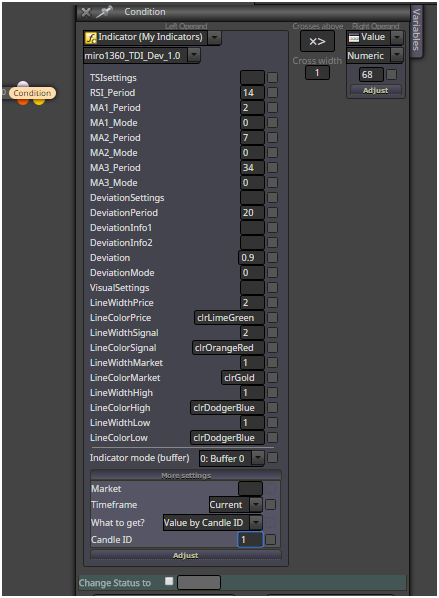
click update and now you can working with this indicator ... see there buffers, parameters,
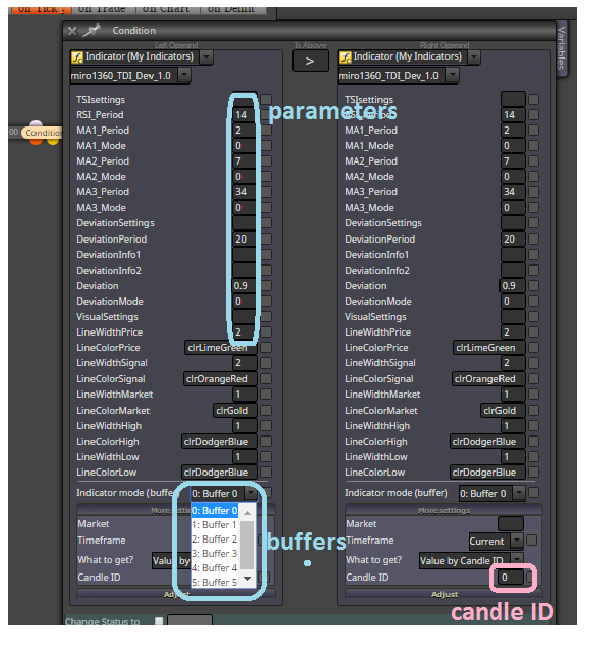
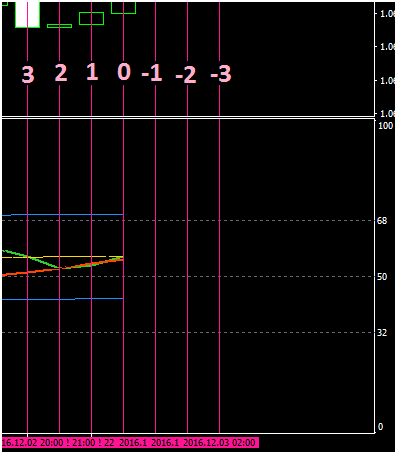
and next important: Candle ID ... for this candle ID you can observe from chart what values are in buffers
for my indicator it are values somewhere from 0 to 100, sometimes >100 or <0
Candle ID are indexes in buffers and buffers are holding values (for each candle ID is here value), small example:
Buffer0[0]=50
Buffer0[1]=52
Buffer0[2]=51
etc ... Buffer0[0]=50 means, that Buffer0 have on candle 0 value 50, Buffer0[1]=52 have on candle 1 value 52 ....when are there negative candle indexes, like -1,-2,... you can read values from indicators that are ploting values into future (like ichomoku indicator) ... if you will this value, only you need is give negative Candle ID into block where you are working with indicator
note, you need compare values from indicator with adequate values (for this indicator, when value from buffer is 60, you can not compare it with value from candle price 1.1200, because how?)
when you will make cross green line above red line on candle 0 (candle 0 is not closed and it means repainting, but is fresh), this is way:
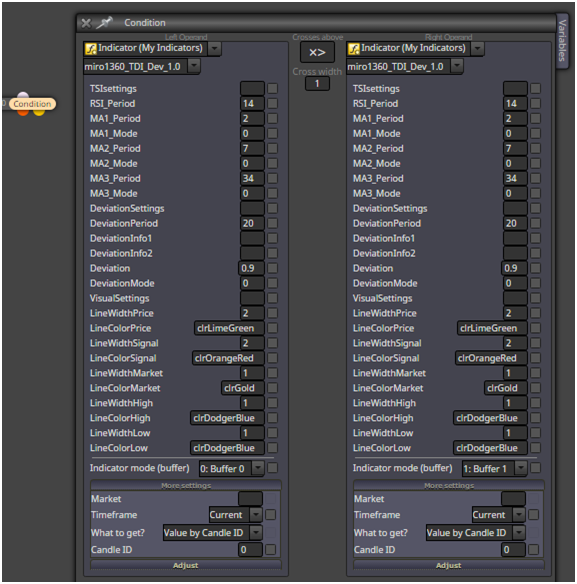
you can take cross also from candle 1 (this is closed candle and is not repaint - repainting this candle depends on indicator, because some indicators repaints all values) ... Candle ID in this case = 1
or you can make cross with two condition blocks with logic:
Buffer0[2] < Buffer1[2] AND
Buffer0[1] > Buffer1[1]
means Candle ID, in words: when green line on candle 2 is below red line on candle 1 and green line on candle1 is above red line on candle 1 (than is cross up)when you will make cross above value, lets say green line crosses UP value 68 (level 68) on closed candle 1, this is how to do:
2.) Import without mq file, with ex file:
If you dont have indicator mq file and only ex file, import can be done this way:
example is my ex file from indicator miro1360_DynamicMA, look for indicator behavior:

you see here 2 buffers
and also some input parameters:
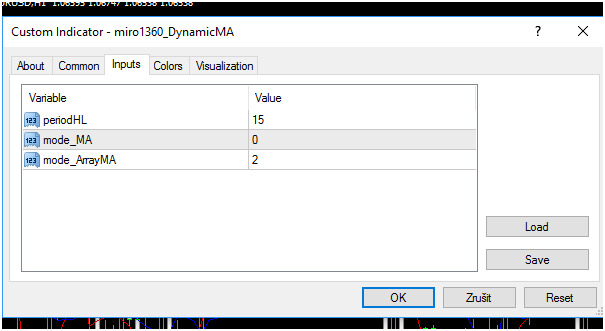
now go to Builder and find your indicator ex file with My Indicator manager:
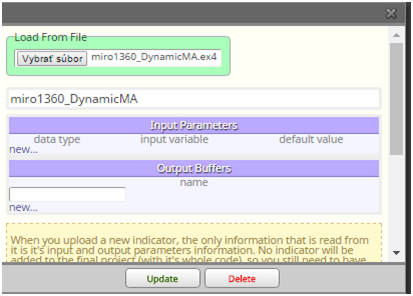
you see, after selecting indicator here are not buffers and parameters, so you need type them manualy, keep data types correctly, instead of enum datatypes you can use int (maybe, I am not sure with implicit conversion in MT5) ...
this picture show you correct values for this indicator:
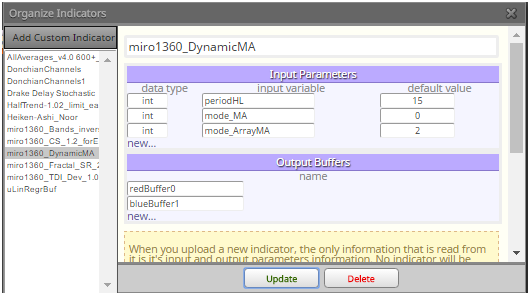
click on update
indicator is imported and test it:
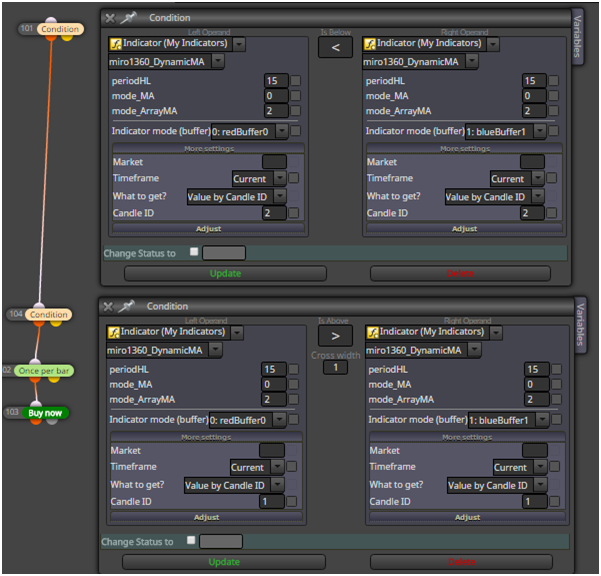
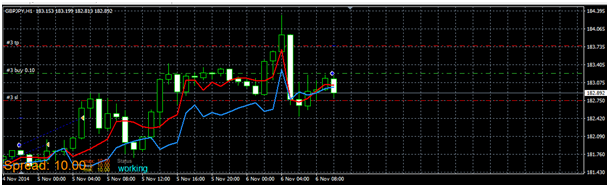
all is working as expected:
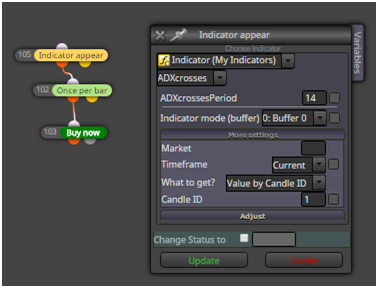
here are other indicators, with other type of buffers, like histogram (histogram is also value),
or arrows, like ADXcrosses, for this case you can use block called Indicator appear and select right buffer:
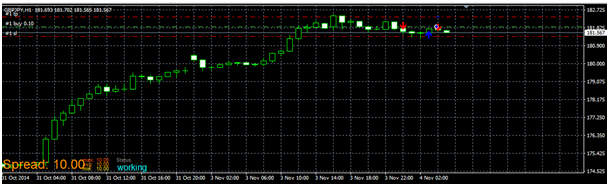
and it is working ok:
Important:
your indicators must be located in indicator folder and must have same name as in EA:
C:\xxxxxxxxxxxxx\MQL4\Indicators
(when experts are located: C:\xxxxxxxxxxxxx\MQL4\Experts)here are some indicators that I used in this tutorial (they are maybe renamed after uploading, rename it as you wish):
1_1480900961494_miro1360_TDI_Dev_1.0.mq4
0_1480900961493_miro1360_TDI_Dev_1.0.ex4
0_1480901002364_ADXcrosses.ex4
0_1480901026428_miro1360_DynamicMA.ex4all for this tutorial
-
RE: Custom Indicators not Uploading Correctlyposted in Bug Reports
upload here or somewhere that indicator and post link here ... maybe that will be better to show you visually ...
-
RE: Custom Indicators not Uploading Correctlyposted in Bug Reports
learn to use constants as input (check tutorials section)
instead of that "enum" boxes (as you named it) you can use number (like 0, 1, 2, 3, etc) ...
if you like rolled checkbox you can use data type as in indicator ...