That is MQL4... in MQL5, we need the custom function because MQL5 doesn't have the native function for DayOfWeek, and this is the reason some people are getting the error...
Q
Posts made by QuantEngineer
-
RE: MT5 Optimizer not working with many FX Dreema EA - RESOLVEDposted in Bug Reports
-
RE: MT5 Optimizer not working with many FX Dreema EA - RESOLVEDposted in Bug Reports
Hello Everyone,
It just needs a Custom Function to identify the DayOfWeek...
Here is the function. It can be copied and pasted into the Custom Functions Section from FX Dreema Studio for MQL5. The path to paste it is:- Load FX Dreema Studio for MQL5 with this link https://fxdreema.com/studio/MQL5
- Go to the bottom right corner of the page, and find a section with the title "Custom Functions",
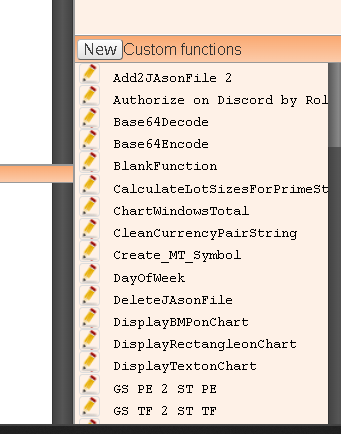
- Click on the "New" button
- Paste the function in the window that will open.
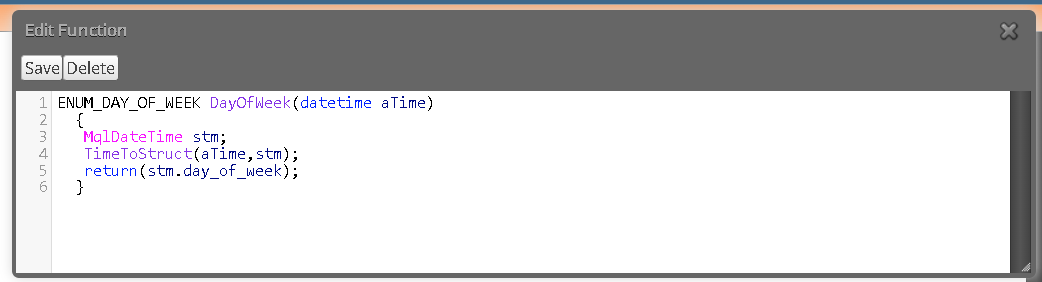
- Click the "Save" button.
And here is the function below to be copied:
ENUM_DAY_OF_WEEK DayOfWeek(datetime aTime)
{
MqlDateTime stm;
TimeToStruct(aTime,stm);
return(stm.day_of_week);
} -
RE: $100 to $350 per hour to take over my ongoing FX Dreema Development.posted in General Discussions
You are welcome to send me a private message here. I am reading my private messages almost every day.
-
$100 to $350 per hour to take over my ongoing FX Dreema Development.posted in General Discussions
Hello Financial Developers,
One of my projects is a Very Successful FX Dreema BOT that trades Gold and Forex for a Software house, and we have been doing some ongoing development for 3 years. In each version, we integrated new strategies and new ideas from the Master Trader. The bot is already in production with nearly 1000 trading accounts, and it is growing the accounts to nearly 2X each year.
Last month, I had to step out of the project because I started a project with a large Broker in Manhattan that is consuming all of my working hours for the moment, and I am trying to help out my previous client to find another developer to replace myself on this FX Dreema project.
It is required to have:
- Deep understanding of FX Dreema
- Deep understanding of MQL5
- A decent understanding of Forex and Gold is needed to be able to discuss the trading ideas of the master trader.
- The programming is done during meetings with the Master Trader on Zoom, so anything less than deep understanding won't fly... It's almost like a hackathon. The client asks for a feature, and the developer has to build the feature and test it in minutes to check the potential profitability of each idea.
It is expected to work some 10h to 20h per month approximately...
The budget is between $100 to $350 per hour depending on your conversation with the client... I don't know what his criteria will be, but the client is very generous and knowledgeable, usually pays for the work within the same week. I won't be involved with the payments, I am just trying to help out this good client that I was working for by finding a replacement for myself.If you are interested, please DM me with your resume and proof of FX Dreema Knowledge, and I will share 3 approved devs with the client to choose his new Dev.
I wish you a good week! -
RE: Recommended VPS services?posted in Questions & Answers
There are many providers, and I have already used several, including Google Cloud VPS, AWS EC3 VPS, etc.... but the one I like the most because it is simple, reliable, and has great support to help when needed, is ForexVPS, they are offering co-location and even guarantee an extremely fast 1 millisecond latency time !
In case you would like to check them out, you are welcome to use the referral link that I am pasting here:
https://www.forexvps.net/?aff=22212 -
RE: Finally, News Filter for MT5 in 1 easy to use Block !!posted in Tutorials by Users
@zearma Thanks for sharing! In this video, the developer is just downloading all the data of the calendar events in advance, and then during the backtest, he places the data on the chart.
This approach can also be programmed for FX Dreema. I did not do it this way because when I was programming it, I did not need to use the back tester, but if my clients would like to hire me to do this work the same way, I would be happy to do it easily.
I wish you a good week!
-
RE: Everybody interesting in creating Custom Blocksposted in Tutorials by Users
If FX Dreema could at least allow users to share custom blocks, that would be a HUGE help already !
-
RE: ATR value to Pips - Tutorialposted in Tutorials by Users
Hello everyone,
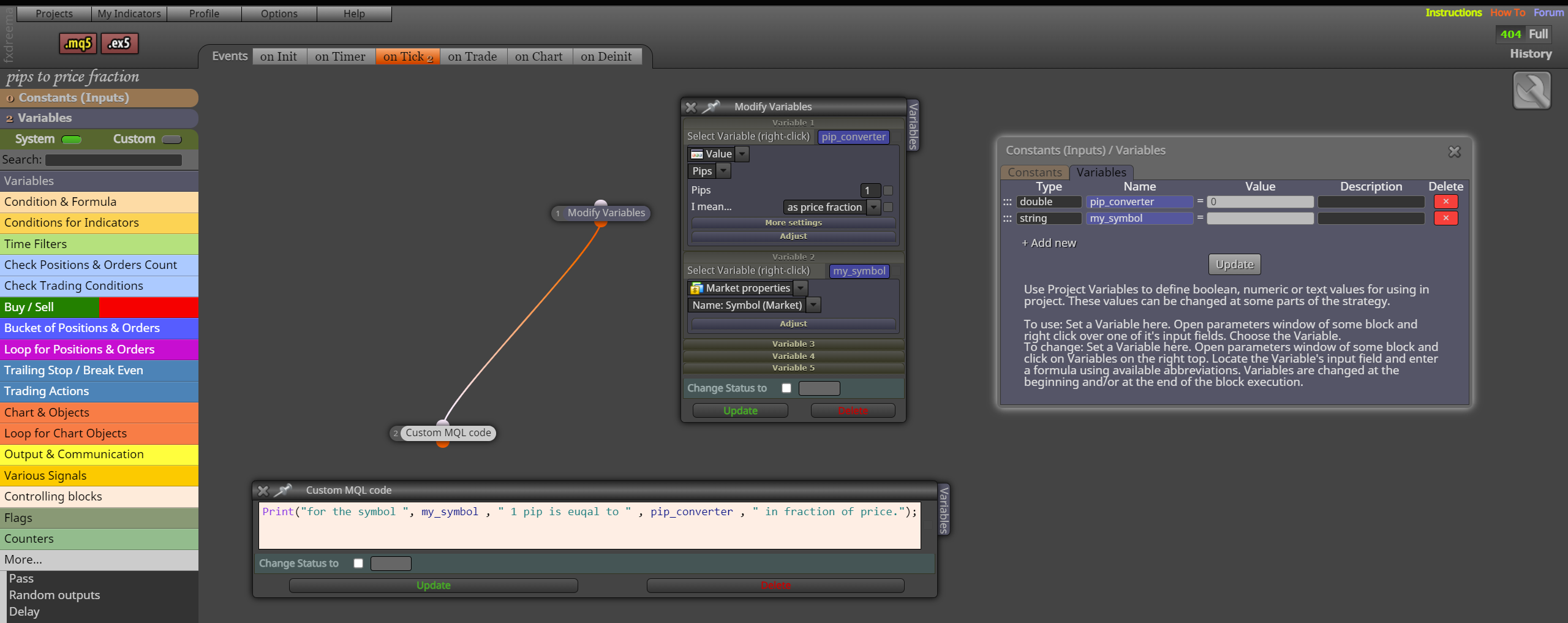
I was just dealing with this pips calculation and I found a very safe way to do that for any symbol. It turns out that it is also the easiest way.
Because this pip calculation involves many possible scenarios, including broker settings, asset class, etc... FX Dreema has already done all this work in advance for us, by creating a function that converts 1 pip to a price fraction, We can just save that to a variable and use it on any calculation to convert pips to price fraction and vice versa, and by using FX Dreema's methods, the compatibility with other FX Dreema's functions will be safer where it uses pips or price fractions.Here is a screenshot:
Safe Bots to everyone!
-
RE: Finally, News Filter for MT5 in 1 easy to use Block !!posted in Tutorials by Users
About the Backtester, aka Strategy Tester, it doesn't display the events because MQL5 inhibits the usage of the Functions and Methods used by the CALENDAR EVENTS group. On MQL official documentation, they say that they do it to speed up the tester.
One possible workaround would be to create a database or CSV File, run the algorithm in live data ahead of the test to fill in the database, then during the test, read the events from the database rather than reading from the source of the events. But because this seems very troublesome to have to run the algo live prior to the test, I didn't implement this solution... If anyone else has any other suggestions on how to overcome this limitation, please feel free to share and use the existing code to implement the solution on top of it.
-
RE: Finally, News Filter for MT5 in 1 easy to use Block !!posted in Tutorials by Users
Hello @nk0815 , the issue that you are describing is related to how you are creating the "Parameters used in Block"... Look for some tutorials about this area of FXDreema Studio or learn about TYPES and you should be able to resolve that. I wish you a good week.
-
Easy to use MT5 indicator for Equity and Balance over time!posted in Tutorials by Users
Hello Everyone, I programmed a small but very effective indicator to track and display the Equity and Balance of MT5 accounts, it can be added to any MT5 EA, just to display Equity and Balance changing dynamically over time as it is trading on the back tester, to make our visualization a lot easier !
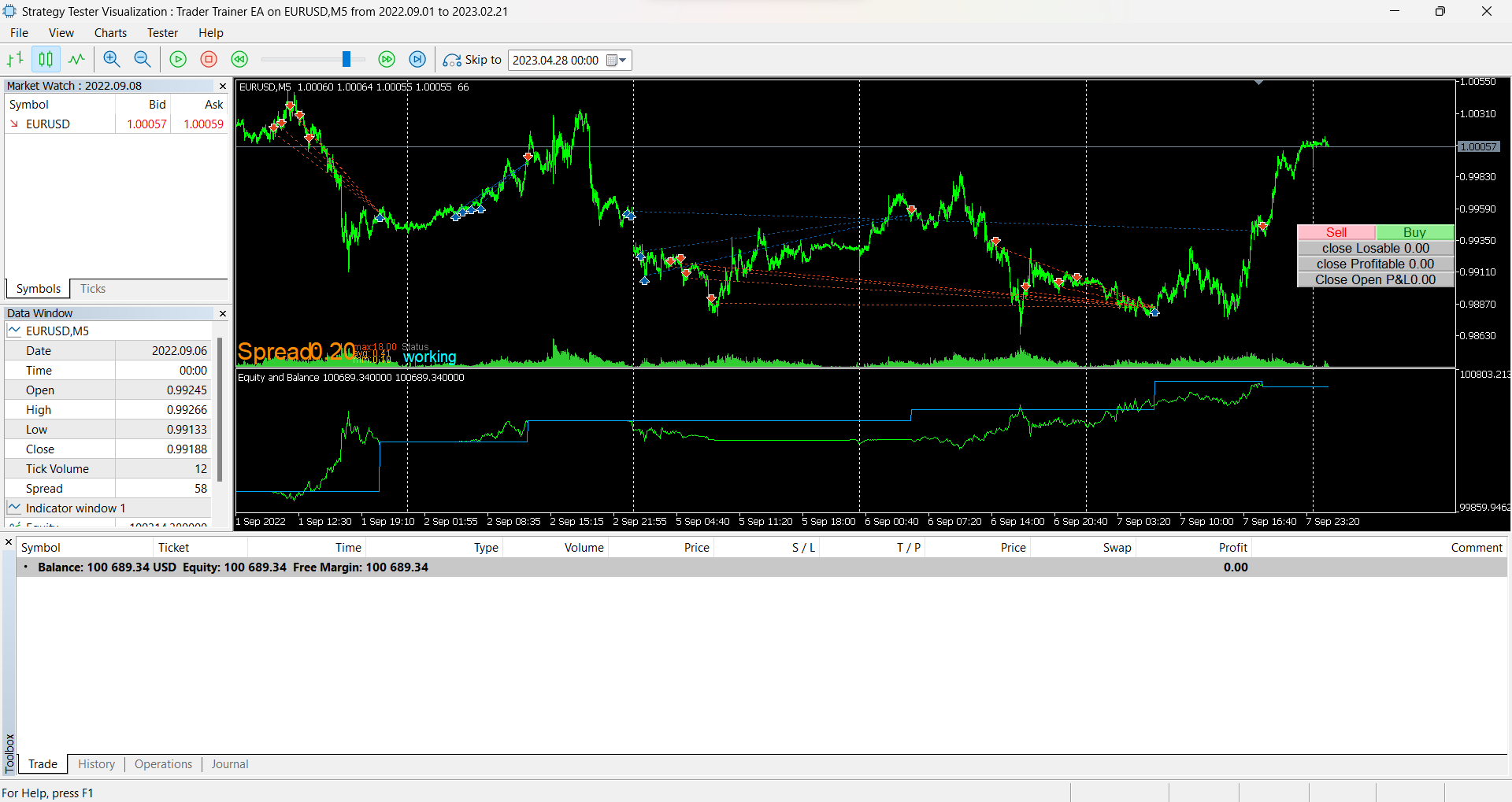
And here is the source code to be compiled on the native MT5 IDE.
Have a good weekend and Enjoy !
//+------------------------------------------------------------------+ //| Indicator: Equity and Balance.mq5 | //| Created by Quant Engineer | //| https://www.abfs.tech | //+------------------------------------------------------------------+ #property copyright "ABFS Inc" #property link "https://www.abfs.tech" #property version "1.00" #property description "" //--- indicator settings #property indicator_separate_window #property indicator_buffers 2 #property indicator_plots 2 #property indicator_type1 DRAW_LINE #property indicator_style1 STYLE_SOLID #property indicator_width1 1 #property indicator_color1 0x00FF00 #property indicator_label1 "Equity" #property indicator_type2 DRAW_LINE #property indicator_style2 STYLE_SOLID #property indicator_width2 1 #property indicator_color2 0xFFAA00 #property indicator_label2 "Balance" //--- indicator buffers double Buffer1[]; double Buffer2[]; //--- Custom functions ----------------------------------------------- double AccountBalance() {return AccountInfoDouble(ACCOUNT_BALANCE);} double AccountEquity() {return AccountInfoDouble(ACCOUNT_EQUITY);} //+------------------------------------------------------------------+ //| Custom indicator initialization function | //+------------------------------------------------------------------+ int OnInit() { SetIndexBuffer(0, Buffer1); PlotIndexSetDouble(0, PLOT_EMPTY_VALUE, EMPTY_VALUE); SetIndexBuffer(1, Buffer2); PlotIndexSetDouble(1, PLOT_EMPTY_VALUE, EMPTY_VALUE); return(INIT_SUCCEEDED); } //+------------------------------------------------------------------+ //| Custom indicator iteration function | //+------------------------------------------------------------------+ int OnCalculate(const int rates_total, const int prev_calculated, const datetime& time[], const double& open[], const double& high[], const double& low[], const double& close[], const long& tick_volume[], const long& volume[], const int& spread[]) { int limit = rates_total - prev_calculated; //--- counting from 0 to rates_total ArraySetAsSeries(Buffer1, true); ArraySetAsSeries(Buffer2, true); //--- initial zero if(prev_calculated < 1) { ArrayInitialize(Buffer1, EMPTY_VALUE); ArrayInitialize(Buffer2, EMPTY_VALUE); } else limit++; //--- main loop for(int i = limit-1; i >= 0; i--) { if (i >= MathMin(5000-1, rates_total-1-50)) continue; //omit some old rates to prevent "Array out of range" or slow calculation //Indicator Buffer 1 if(true //no conditions! ) { Buffer1[i] = AccountEquity(); //Set indicator value at fixed value } else { Buffer1[i] = EMPTY_VALUE; } //Indicator Buffer 2 if(true //no conditions! ) { Buffer2[i] = AccountBalance(); //Set indicator value at fixed value } else { Buffer2[i] = EMPTY_VALUE; } } return(rates_total); } //+------------------------------------------------------------------+ -
RE: MT5 Optimizer not working with many FX Dreema EA - RESOLVEDposted in Bug Reports
That is cool ! thanks for the feedback!
We have to watch out because the reason why FX DReema creates the infinite loop is that when the EA is attempting to close a large number of positions, many of the commands can get rejected for multiple reasons and that is why it might need to go back and make new attempts to close positions over and over again, until they all close. If people choose to close them with the for loop, it is a good idea to run the loop multiple times on the same group of trades to ensure all the positions close.
I believe it might be related to the asynchronous close, it works a lot faster than the synchronous close but leaves some positions behind sometimes...
-
MT5 Optimizer not working with many FX Dreema EA - RESOLVEDposted in Bug Reports
Many times the MT5 optimizer doesn't work with many FXDreema EAs, and that was very limiting to building professional-level trading strategies properly tested.
I got to the bottom of this bug, and here is what is happening:
There is a class used to close multiple trades called "MDL_CloseOpened" and this class has a main loop "while (finished == false)" , that keeps doing infinite attempts to close the positions that match the criteria...But some brokers have a data feed of prices (candlesticks) during hours when they do NOT allow trade... If the Close block runs during non-trade hours, then the loop will never end... and the backtest never completes... that is why the Optimizer gets stuck...
To resolve this issue, we need to know if the broker allows trading before using the Close Block... (the blue Block...)
The MQL5 native function to check on that is SymbolInfoSessionTrade() and can be found on the official documentation on this link:
https://www.mql5.com/en/docs/marketinformation/symbolinfosessiontrade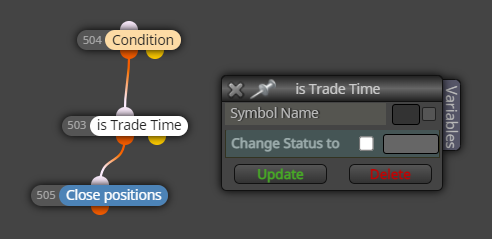
I created this small block called "is Trade Time" to be placed before the Close All block, to prevent this infinite loop.
Find the source code for FX Dreema Studio below... remember that you will need to create the parameter ttSymbolName (type string) on FX Dreema Studio. Enjoy the solution and happy week.
//Create string Paramter ttSymbolName datetime SessionStart; datetime SessionEnd; datetime SessionTimeNow = StringToTime("1970.01.01 " + TimeToString(TimeTradeServer(), TIME_MINUTES)); if (ttSymbolName=="") { ttSymbolName = (string)CurrentSymbol(); // Known Issue, function has to be called twice in a row, anyways, not working well, unless opening the chart in advance, for some reason. ttSymbolName = (string)CurrentSymbol(); } //Print( "checking ttSymbolName=" , ttSymbolName , " Symbol=" , Symbol() , " CurrentSymbol()=" , (string)CurrentSymbol() , " Symbol()=" , Symbol() , ", _Symbol=", _Symbol ); //Print( "checking ttSymbolName is " , ttSymbolName , " CurrentSymbol()=" , (string)CurrentSymbol() , " Symbol()=" , Symbol() , ", _Symbol=" , _Symbol ); //Print("Current time is ", TimeToString(TimeTradeServer(), TIME_MINUTES), " SessionTimeNow=", TimeToString(SessionTimeNow)); int SessionIDLoop = 0; bool isthissessionactive = false; while (SymbolInfoSessionTrade( ttSymbolName , DayOfWeek(TimeTradeServer()) , SessionIDLoop , SessionStart , SessionEnd ) ) { //Print("while cycle #", SessionIDLoop, ", on symbol " , ttSymbolName , " on dayofWeek " , DayOfWeek(TimeTradeServer()), ", Now is ", TimeToString(SessionTimeNow, TIME_MINUTES), ", Starting at ", TimeToString(SessionStart, TIME_MINUTES), ", ending at ", TimeToString(SessionEnd, TIME_MINUTES) ); if (SessionTimeNow>SessionStart && SessionTimeNow < SessionEnd ) { isthissessionactive = true; break; } SessionIDLoop++; } if (isthissessionactive && TerminalInfoInteger(TERMINAL_TRADE_ALLOWED) && MQLInfoInteger(MQL_TRADE_ALLOWED)) {~next~} else {~inext~} -
RE: Assigning values to Global Variables with Custom Code in FX Dreema Studioposted in Questions & Answers
I haven't found yet the "FXDreema way" to do that... The solution I am using is to declare global variables, classes, arrays, etc... on FXDreema Studio, these objects are public on global level... and can be read from anywhere else in the code... not ideal, because the developer has to know in advance the names of these variables... but it works well also... I would love to know the method officially used by FX Dreema... if someone bumps into it, please make it public...
-
RE: Easy way to make ENUMposted in Tutorials by Users
Exactly !
It is good to match the interior beauty with some exterior beauty when possible! -
RE: Easy way to make ENUMposted in Tutorials by Users
About the inputs of the EA, is anyone here familiar with the groups feature ?
on the MQL5 documentation, it is mentioned an input type called group, to make the user inputs panel more organized... https://www.mql5.com/en/docs/basis/variables/inputvariables -
RE: Easy way to make ENUMposted in Tutorials by Users
Hey Roar ! Thank you so much ! You are amazing !
-
RE: Finally, News Filter for MT5 in 1 easy to use Block !!posted in Tutorials by Users
Thank you for the kind words of cheering, I appreciate your comments.
-
RE: Finally, News Filter for MT5 in 1 easy to use Block !!posted in Tutorials by Users
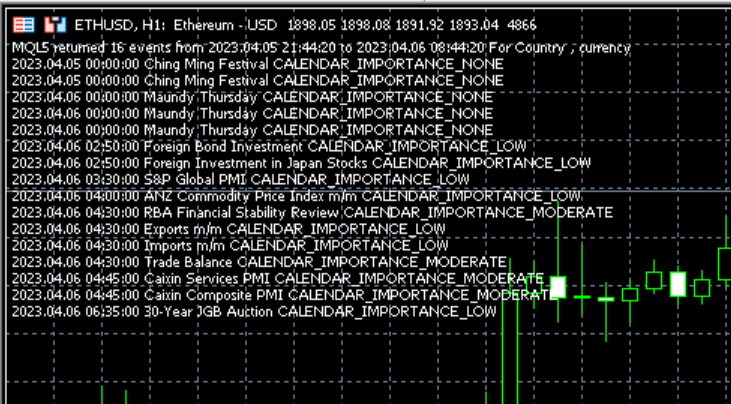
And here is how the chart will look like, in case the verbose mode is set to true