TXT Files won't hold all the necessary features of the custom blocks, for example parameters, types, etc...
Q
Posts made by QuantEngineer
-
RE: Finally, News Filter for MT5 in 1 easy to use Block !!posted in Tutorials by Users
-
RE: Finally, News Filter for MT5 in 1 easy to use Block !!posted in Tutorials by Users
I haven't seen this option, and when I download the entire source code of the EA that uses custom blocks by pushing the "MQ5" button, it doesn't import correctly on other FX Dreema accounts... it only imports on the FX Dreema account that has the custom blocks.
Inputs on this are appreciated. -
RE: Finally, News Filter for MT5 in 1 easy to use Block !!posted in Tutorials by Users
That will be awesome!
Does someone know how can a complete block be shared with other users? -
RE: Finally, News Filter for MT5 in 1 easy to use Block !!posted in Tutorials by Users
@forexalgo , currently, I am not accepting work requests via the forum. I appreciate you considering me to do this work for you.
-
Simple Custom Block to detect Hedging or Netting Accountsposted in Tutorials by Users
It is known to all developers that running the logic of the EA for netting accounts is usually different from hedging accounts, and sometimes, not even desirable to run on certain types of accounts.
To resolve this, I have created the simplest custom block that will detect if the account being used is hedging or not. With this block, developers can even decide to terminate the EA, in case it is not running on the right type of account, or the developers can also choose other logical paths, depending on the type of account.
In this simple 1 step tutorial, we will create a custom block that looks like the above image.
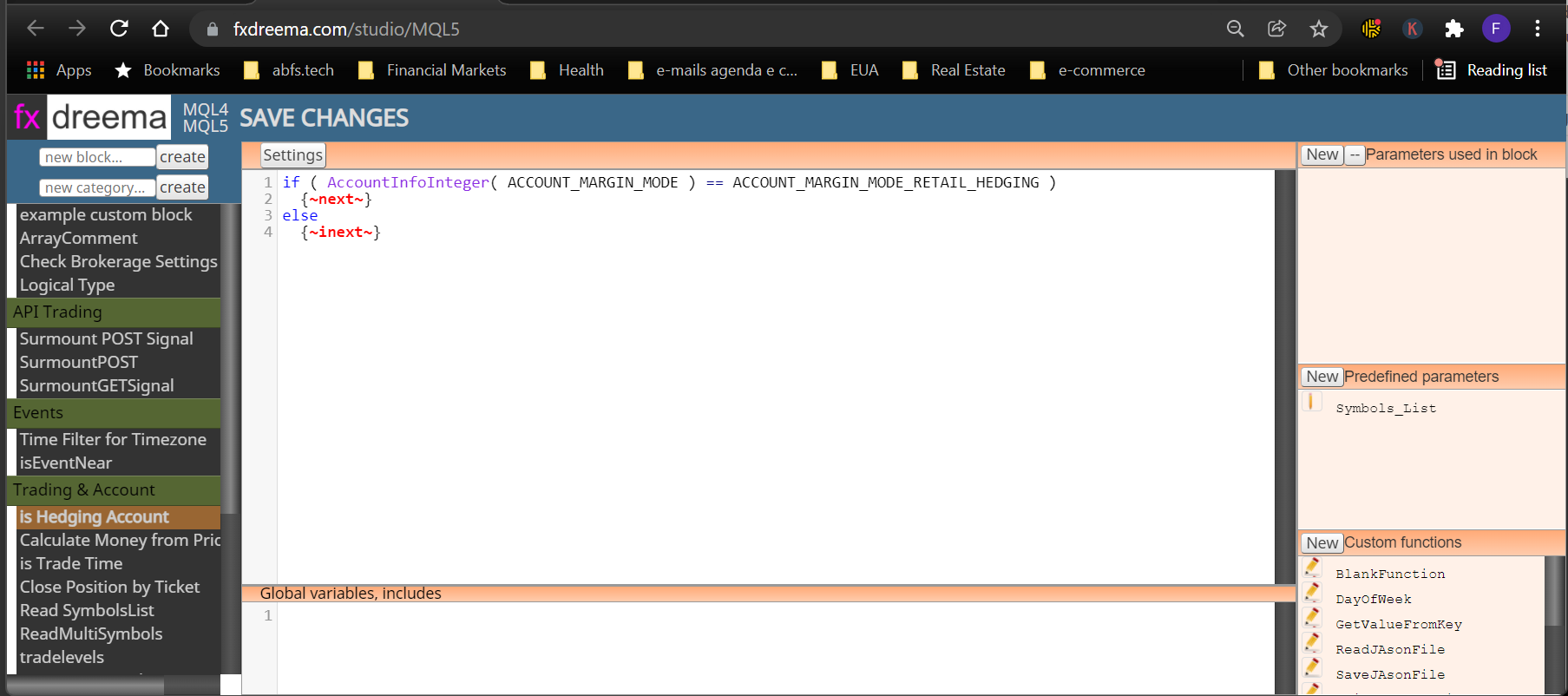
This Tutorial is ideal for someone just starting out on creating their own custom blocks, because it only uses 1 area of FX Dreema Studio. Just open up your FX Dreema Studio, create a new block and copy paste this code into the main area:
if ( AccountInfoInteger( ACCOUNT_MARGIN_MODE ) == ACCOUNT_MARGIN_MODE_RETAIL_HEDGING )
{~next~}
else
{~inext~}Once this is done, just click Save changes, and that's it.
Your custom block will show up on the appropriate region of your FX Dreema Builder.
Allright, this was the easiest tutorial on the Studio, about building useful blocks! Hope you all enjoy it!
I wish you all the best! -
RE: Motivation resultsposted in Questions & Answers
@chikano11 said in Motivation results:
Hi all,
I am a bit stuck with my EA, and it seems like most can create perfect EA''s, but when it comes to results/performance its quit.
I don't ask to drop your "Profitable" EA, but please when you have a good performance show the "Live" result. For example: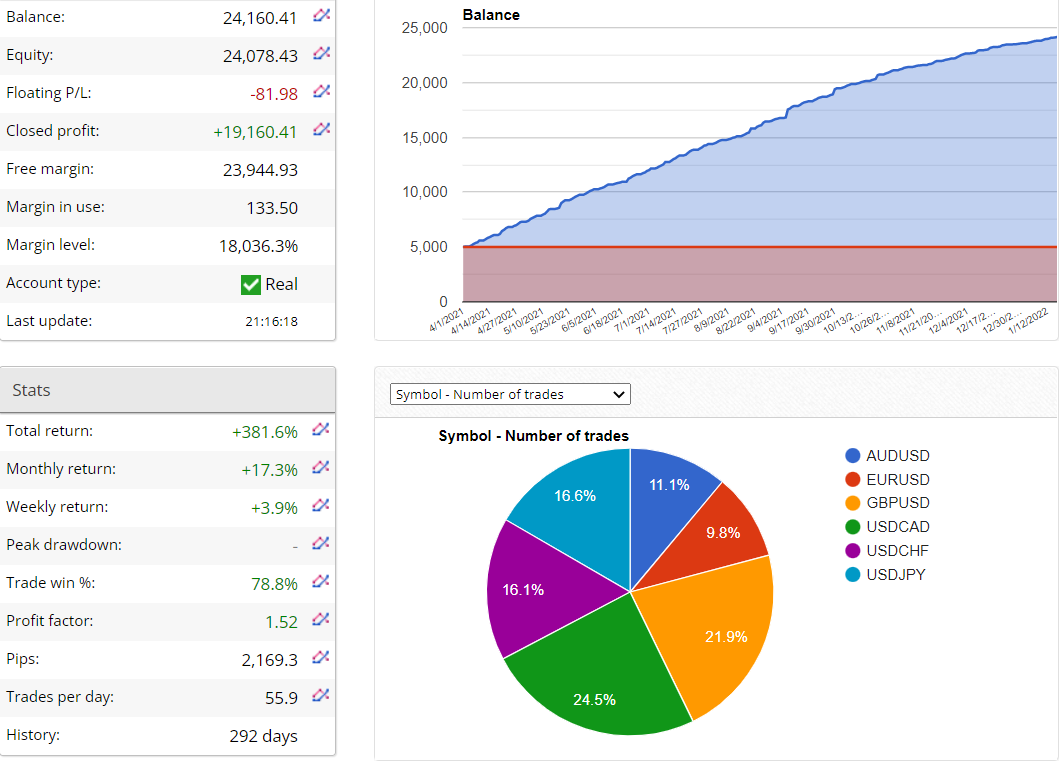
By the way, by reading your awesome balance growth curve, I can tell by the concavity of it, that the system has a really cool winning strategy, but it is missing out on managing the lot size. It could be upgraded by using some of the FX Dreema tools for money management, to convert this curve into an exponential growth curve.
-
RE: Motivation resultsposted in Questions & Answers
@chikano11 This is a really really cool idea!
Like this, people can get more motivated!
Loved this idea! -
Finally, News Filter for MT5 in 1 easy to use Block !!posted in Tutorials by Users
Hello Fellow FXDreema users!! Because I Love FX Dreema, I have decided to build a News Filter that can be entirely coded into 1 block that can be compiled directly in the FX Dreema Cloud System !
Enjoy !The goal of this tutorial is to build 1 custom block that I call "isEventNear" and it will look like this, at the end:
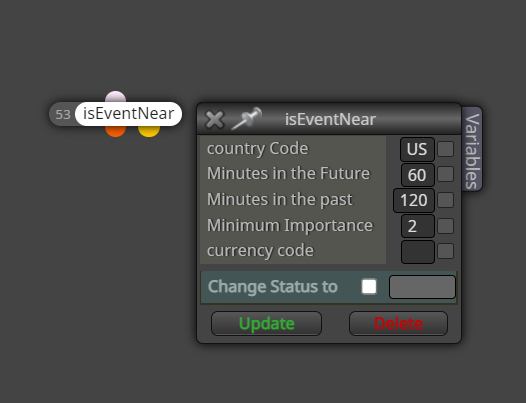
Notice that this block has the 2 dots underneath, for true or false... meaning that if there is an important event near, then the next block to be processed will come from the orange dot, and if there isn't any event near, then the next block to be processed, will be coming from the yellow dot... it is the same concept as any other conditional block.
By near, it means near in time... less than x minutes in the future, or less than y minutes in the past.
Minimum importance stands for the importance of the events to trigger this block... refer to the original MQL5 manual, where it explains the importance of the events, on this link, where the possible importance vary from 0 to 3, being None, Low, Moderate, High. https://www.mql5.com/en/docs/constants/structures/mqlcalendar#enum_calendar_event_importanceHere is how I have built this block
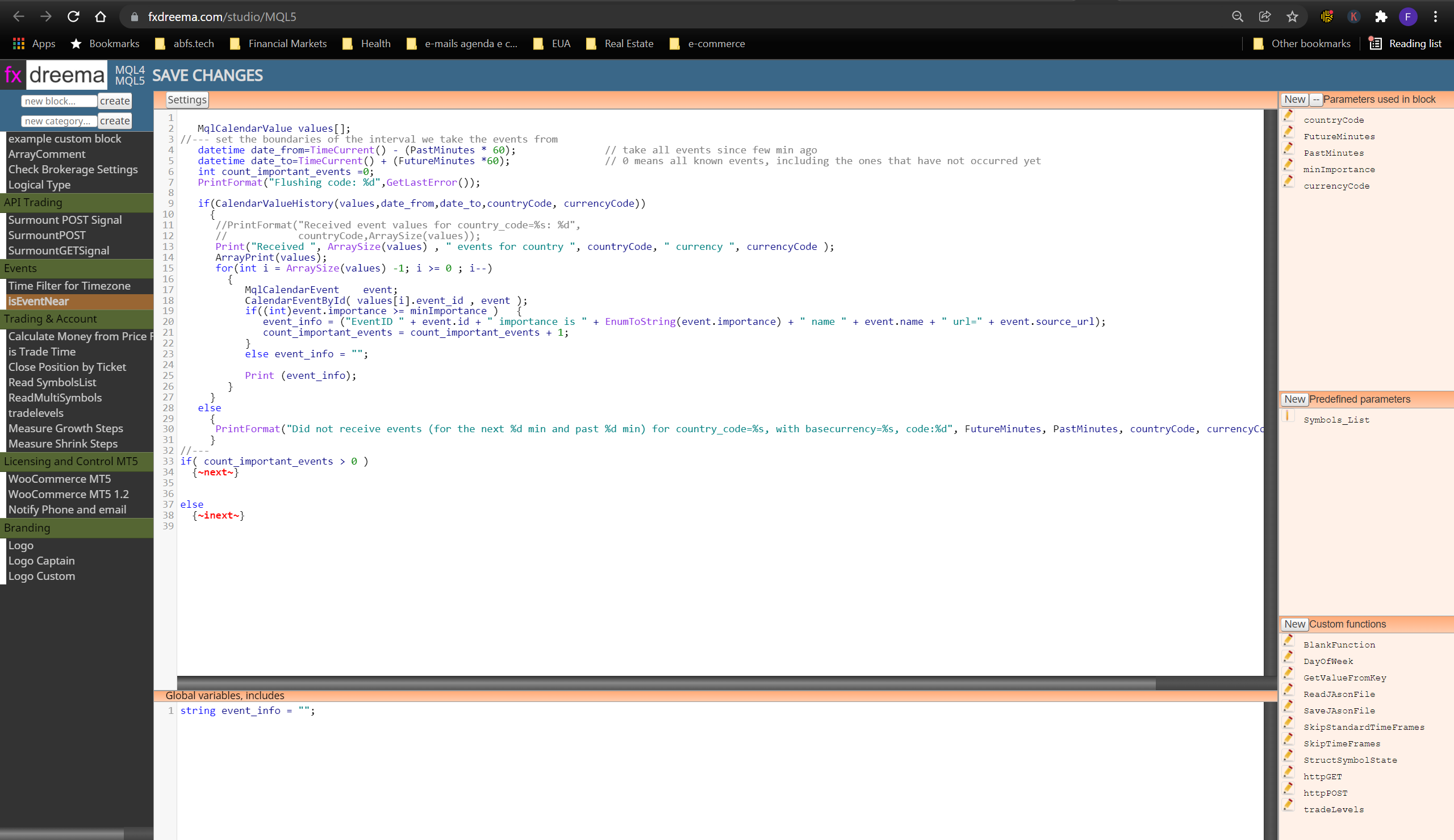
Notice that I am using code in 3 key areas:- The "main code area", where I have typed the main codes for the custom block.
- The "Global variables, includes" area
- The "parameters" area, where this block will receive parameters from the developers.
That's it. pretty simple. the developer of @fxdreema has done a really GREAT JOB, by making the studio available for us !
In case you still don't know how to use the studio, check out my previous tutorial on the basics of how to use FX Dreema Studio.
I wish you all a very successful and happy 2022! -
RE: Money Management Formulaposted in Questions & Answers
In the Current version of MQL5, there is a function called OrderCalcProfit() that does this job of calculating potential profits or losses for hypothetical scenarios.
Here is the link, in case someone else is interested https://www.mql5.com/en/docs/trading/ordercalcprofit -
Issue with loading Custom Indicators from EX5 files resolvedposted in Bug Reports
I was working with some custom indicators, without source codes today, and resolved the issue where the compiler doesn't compile correctly... Since I thought that someone else might have the same issue, I have decided to post it here.
The issue: Loading data from Custom indicators without Source Codes, on blocks like this.
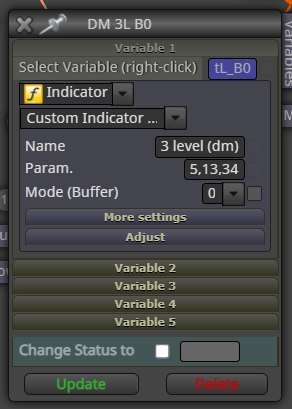
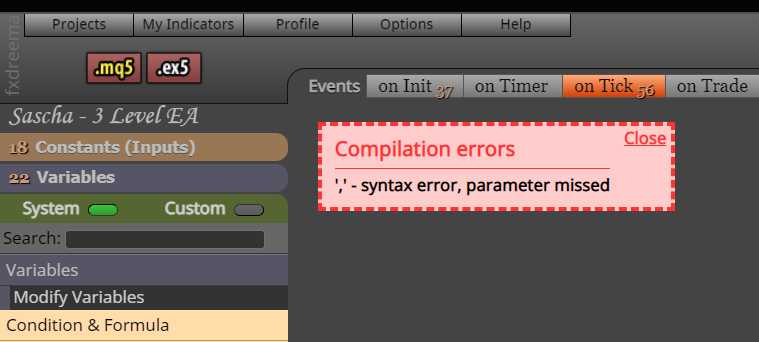
This error will show up if no parameters are passed to the indicator:
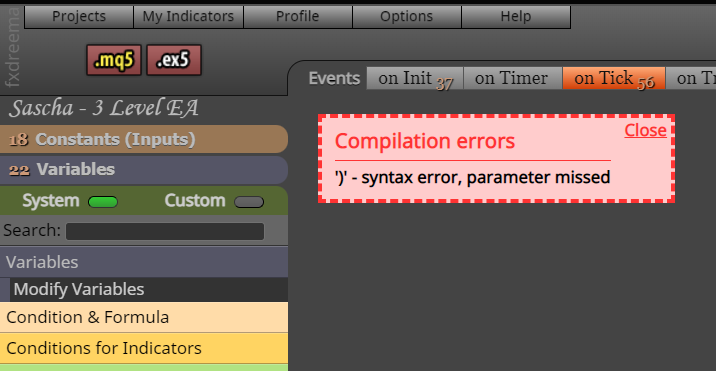
This other error will show up in case you do pass some parameter.
The solution:
Generate the mq5 file by clicking on the "mq5" button.
Open up the file on Metatrader's IDE and remove the extra comma that is hanging there.Enjoy Custom indicators working in your algo.
In case anyone else has an easier solution for this bug, please post.
-
RE: Assigning values to Global Variables with Custom Code in FX Dreema Studioposted in Questions & Answers
Hello @tipsywisdom , thanks for interacting. I am not quite sure i understood what you mean... The block on your description seems to be the original block that assigns values to the user created variables, in the class v::
I am working to make 1 of my custom blocks do the same thing as this block does... I have created a custom formula to calculate trade volumes, and i want to save the calculated volume to any user defined variable , like the "modify variables" block does. -
RE: Assigning values to Global Variables with Custom Code in FX Dreema Studioposted in Questions & Answers
I did not start the creation of this block yet, because it would require this specific knowledge, on how to assign values to a user variable from the class V:: using FX Dreema studio.
-
Assigning values to Global Variables with Custom Code in FX Dreema Studioposted in Questions & Answers
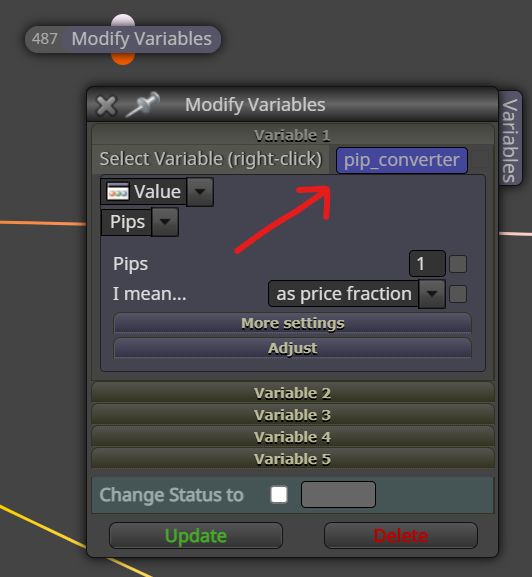
I have been creating some custom blocks using FX Dreema Studio, and it has been great and really helpful to create my own blocks for the EAs, and this week I got to a situation that seems simple, but I still couldn't figure how to do, I want to assign values to Global Variables, on my custom blocks made with FX Dreema Studio.
Something like what the original "Modify Variables" Block is doing, when we place a variable to receive the values in it. In the example below, the original block is assigning a value to the User Variable called "pip_converter".The question is how to mimic this behavior using FX Dreema Studio?
-
Tutorial - Create Custom Blocks with "FXDreema Studio"posted in Tutorials by Users
Hello Developers,
This is a simplified tutorial on how to build Custom Blocks using "FX Dreema Studio", which is part of "FX Dreema"
Step 1 - Since The Studio works in a separate link, use your internet browser to navigate to https://fxdreema.com/studio/MQL5 .
Step 2 - Choose the platform you are using, by clicking MQL4 or MQL5
Step 3 - Name and Create your new Block
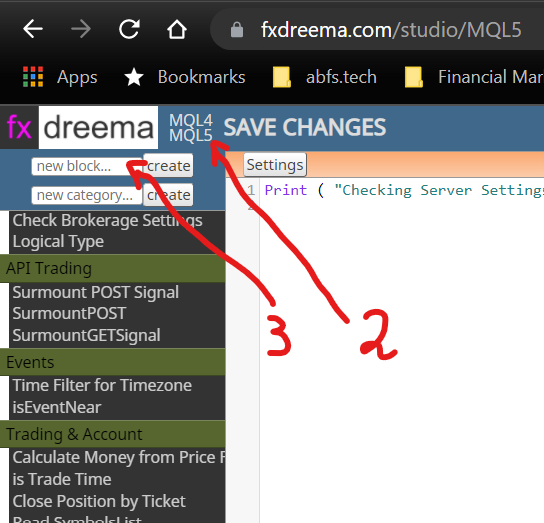
Step 4 - Create your Block by writing your code on Region A, Put your Global Variables on Region B, Create Input Parameters for the Block on region c, Pre-defined parameters go in region D and Global Functions for all your custom blocks will go on region E.
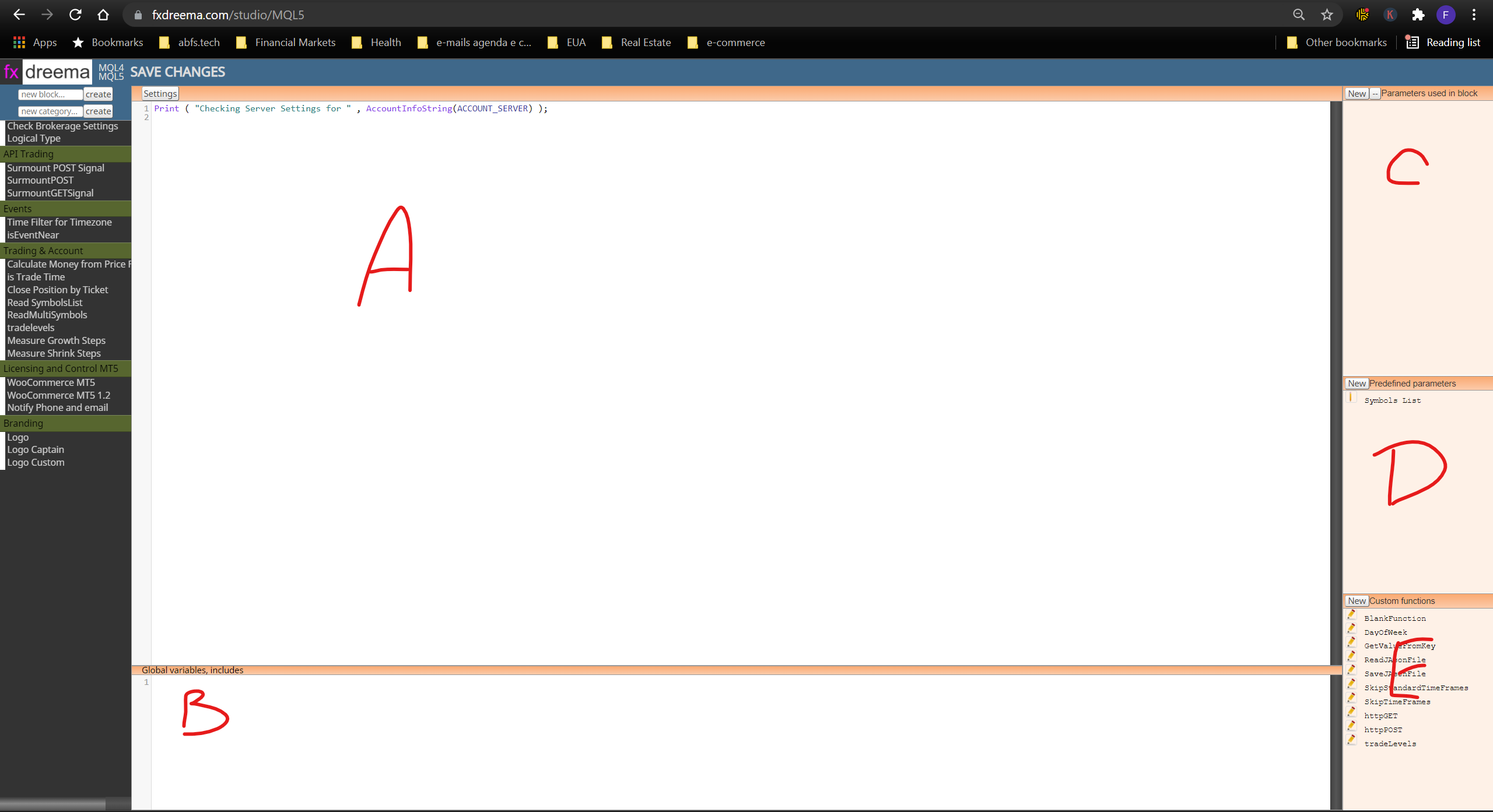
Once you go through these basics, it is pretty straightforward.
I hope you enjoy this intro tutorial, that will save time on getting your fingers moving. -
RE: FX Dreema Locked out now. Is it only my account or everyone else's accounts?posted in Bug Reports
Update: Resolved !
in case anyone else gets stuck in the same issue , here is the solution: I have deleted the latest code I was working on the FXDreema Studio, then the main part, the builder went back to normal !
I wish you all good Bots !
-
RE: FX Dreema Locked out now. Is it only my account or everyone else's accounts?posted in Bug Reports
I am still working on unlocking the FX Dreema account, the FX Dreema Code Studio on https://fxdreema.com/studio/MQL5 is still working .