@mark_madhukar Hello @mark_madhukar! First and foremost, fxDreema does not allow you to perform Indicators, you can perform EA, s and Scripts but nothing else. On the other hand if what you need is to create an EA that allows you to create a line and obtain the distance in pips or at points in that if I can help you, I have created a panel that generates a horizontal line by pressing a button that you can move and position and pressing another button then opens an operation (according to the button) BUY or SELL with the Stop Loss where there is the Horizontal line and with the Lotage corresponding to the distance and the risk you want to apply; If this is what you need, comment on it and I'll help you create it.
Posts made by XYON126
-
RE: display distance between a horizontal line and current price in pipsposted in Questions & Answers
-
RE: Minimum Stop Loss allowed vs. coinposted in Questions & Answers
@banditdos Very good question; I am also interested. But @Banditdos does not open the operation or on the contrary it opens it but without Stop Loss?
-
RE: Draw Tredlineposted in Questions & Answers
@l-andorrà Hello @l-andorrà, if I wanted to mark the points with the mouse block option, what should I modify there and how should the mouse blocks be?
-
RE: @roar, Sell now and Buy now with% of Balance or% of Equity but with minimum lot. (Solved)posted in Questions & Answers
@pontedruse Hello PPP! Thank you very much PPP. The formula that you gave me was very good, now it is only the real value, that is, what has to be put in the box to get 0.5%, 1%, etc. without having to put the two blocks that you put me,Since the account is higher than € 3000, the minimum value exceeds 0.02 Lots, and now it should come out 0.03 or similar.

Sorry, another query on the same topic, The formula (the two blocks) that you gave me is indifferent for the PAR (EURUSD, GBPJPY) or it also varies according to the PAR
-
RE: Draw Tredlineposted in Questions & Answers
@jsauter86 , @l-andorrà I need to draw a tredline with a button but I do not know how the tredline works to indicate the starting coordinate and the final coordinate indicating it with the mouse and at the same time giving it a specific name so that neither indicators nor draw them manually without first pressing the button.
-
RE: @roar, Sell now and Buy now with% of Balance or% of Equity but with minimum lot. (Solved)posted in Questions & Answers
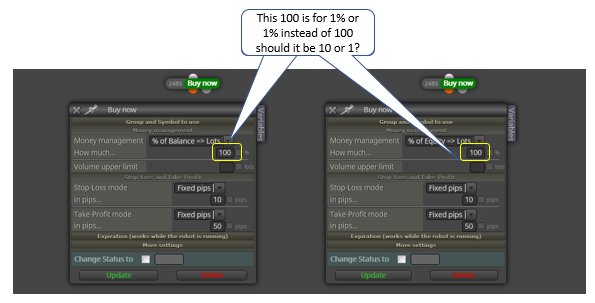
@pontedruse Hi @pontedruse ! I have a question that I think you can solve for me, since many colleagues have answered me but all different and they have not clarified it and I think that you can; It refers to the percentage in money management, when we choose the "% of Balance" in money management and you want 0.5% of your capital, what number should be placed 100.5 or 0.5 and the same for the "% of Equity". Thanks a lot
-
RE: Delete all object on the chart posted in Questions & Answers
-
RE: Delete all object on the chartposted in Questions & Answers
@zedeai2 Hello! One question, you need to delete all the objects of your active window continuously or on the contrary that at a given moment you can clean the window by the amount of elements. I ask you if a Script would be good for you to clean the active window when you are interested without having to be in the EA, if so in MQL there are several that do it but I can also pass you the link, if you want the EA will do it, I can assure you that you will need a lot of blocks and some code, I have tried it and finally I use the Script that is most useful to me, quickly and when I need it.
-
Draw Tredlineposted in Questions & Answers
Hello! I need help and information. I want to draw Tredlines in my chart, I want to draw them by hand or with a button that allows me with the mouse to select the point of origin and the other point to create it; making the button is not a problem, I know how to do my problem is the block of drawing Tredlines, how to use it and how to select the Tredline with the mouse. Can anybody help me. Thanks a lot.
-
RE: Size Of Lots Not Impacting Buy Size in MT4posted in Questions & Answers
@jsauter86 Exactly, for more information I am attaching a table that will clarify the Stop Loss and Take Profit, the% A are the winning operations, the% F are the operations with losses, as you can see, the Ratio(Relacion Riesgo/Beneficio (R) is very important but also the statistics, since Ratio(R) The higher the lower chances of the operation being a winner and naturally if the Ratio is negative (in red) in the medium term you lose 100%
-
RE: Connect Button to the block areaposted in Questions & Answers
@zedeai2 Here is an example of buttons, I hope it helps you or comments your doubts after trying it. As it has variables when you open it, you must save it as MQ4 and reopen it but from your PC where you have saved the MQ4.
-
RE: Size Of Lots Not Impacting Buy Size in MT4posted in Questions & Answers
@moonkay
Hello! Regarding the $ 450, yes, that amount with an account of $ 1500, no legal and serious Brocker will allow you to do it, in the operations window (demo and real, not Backtest) as you see in the photo there are 3 operations, one of 4Lots, another of 5Lots and another of 0.02 in an account of € 3000, and with a magenta box what is the percentage of Free Margin and in € and another Margin that is the free amount that the Brocker allows you at most in an exchange losses Note that with 4 and 5 lots that is approximately 10% and 11% with only 1 or 2 pips you are in losses of € 250, normally for a winning trade you leave a Stop Loss of a minimum of 15 to 20 pips, which is that is, you are risking with a 10% lot (4 lots) € 1500 but you only have a Margin of approximately € 1000 at the moment the trading line hits the stop loss if the Margin is less than the risk of the account you closes and all capital is lost, so risking more than 1% of Capital per operation is not or more advisable, since in a short moment it will lead to the ruin and loss of the account, the traders with a lot of experience risk a maximum of 0.5% or 0.8% per operation and a maximum of 10% of total losses in a month, with You will keep these data and you will get what traders who have been earning money for a long time but make no mistake, never more than 20% of the account, whoever tells you that they earn more is cheating you or wants to scam you because it is statistically impossible even if you win one 10% trade as the next 10 or 20 trades you will lose almost everything and this is the true reality.
-
RE: Size Of Lots Not Impacting Buy Size in MT4posted in Questions & Answers
@moonkay Hello @Moonkay ! I have looked at your EA and I was surprised by two comments you make:
1º You comment that you apply 30% of $ 1500 and it works perfectly.
2nd That you change it, you set it to 50% and it does not act.Regarding the 1º, I am very surprised that the MT4 allows it with 30% the result is very high and unless you have a false Brocker or with a very doubtful regulation 30% does not allow you to open any operation and much less with 1500 $, at most 1 maximum operation until it is closed and if it goes into losses you lose 30% which is a lot until the point of account closure.
Regarding the 2nd, how do you change it? Modifying the EA parameters from the MT4? If so, it is logical that there will be no operation you exceed multiplied by 10 the maximum of the Free Margin and you will never open a trade even if you have $ 1,000,000; Another thing is if you are applying 3% and 5% then first verify that you have a positive Free Margin higher than what you will have, as a general rule MT4 or I will not open the operation or in Brocker little serious they open it with the maximum stipulated to be able to open the operation (5% below the Free Margin) and thus close the account when you enter losses.
On the other hand, if your intention is to change the lot and make it more practical for you, I would advise you to put 2 buttons, one to enter the% or the lot you want and another to apply it, something similar to the panel that comes by default in the MT4 and so you can configure it to your liking.I hope I have helped you and clarified unknown issues by many traders about the maximum amount and the lot.

-
RE: Trading information for fxDreema and MT4-MT5.posted in Questions & Answers
@l-andorrà I have already verified it 3 times and not even a comma is missing, today I have detected that it goes a little faster and some buttons that did not work now do work so I no longer know if it is the MT4 management capacity, do you know if in MQL Is there any section to report the management capacity according to the Hard or its limitations?
-
RE: Constante despegableposted in Questions & Answers
@l-andorrà Hola @l-andorrà , el panel de la foto anterior no es funcional al 100% pero tengo otros con otros botones que si lo son, ¿Que botones con que funcion necesitais y si lo tengo realizado lo comparto sin problemas pero puntualizo, tu ya tienes conocimiento de ello, con el fxDreema libre no funcionan ya que tienen mas de 10 bloques, tienen un orden de 20 a 30 minimo?
Este panel es operativo al 100% , las operaciones estan configuradas con un riesgo fijo aprox. de 3€ o 5€ con un SL de 15 pips y un TP de 50 pips, es decir con un ratio de 3:1+ gastos de comision, spread, etc. naturalmente aproximado +- 0.5€ por operacion.:

https://fxdreema.com/shared/HQiLTI6Jc
Los botones tienen una limitacion, solo se ejecutan en el PAR activo no en todos los PARES abiertos o ventanas abiertas, solo en la ventana en que se encuentre el Panel, por otro lado, si teneis una EA (estrategia de trading) y quereis que funcione tambien en la ventana del panel solo teneis que incluir la estrategia completa en el EA del panel sin omitir ningun bloque de ninguna pestaña y mucho menos las constantes y variables y os funcionaran las dos al mismo tiempo, cuando se abre una operacion os saldra con el comentario de "Riesgo3€" o "Riesgo5€". Si os sirve perfecto por lo contrario podeis configurarlo a vuestro gusto. Ah! lo que esta en "on Timer" debe quedarse ahi o cada vez que apreteis un boton tardara según el Timeframe entre 5 segegundos y 30 segundos pues es el tiempo de un TICK.
-
RE: Trading information for fxDreema and MT4-MT5.posted in Questions & Answers
@l-andorrà Hello @l-andorrà . Yes! I tested them separately as indicated, even when the panel at the level of opening and closing operations buttons is concerned but I added another option that was to exit with buttons a list of pairs that separately worked perfectly but now all together the initial buttons do not work or they get stuck.
-
RE: Drop-down menu & Ea, s within EA,s.posted in Questions & Answers
@miro1360 Thank you very much @miro1360 . How is it enabled and disabled, with what button? I have not been able to find it.
-
RE: ¿alguien con experiencia me puede ayudar a crear un EA por favor?posted in Questions & Answers
@sam77 Como dice @l-andorrà te podemos ayudar, dinos cual es tu idea o si tienes algo realizado compartelo y te ayudaremos.
-
RE: Constante despegableposted in Questions & Answers
@leka-0 Hi. Regarding the drop-down I have a panel that with the help of @miro1360 does something similar, maybe by changing some code, the drop-down can be made on the other hand you always have the option of making a panel with several buttons that execute what you need, for example: