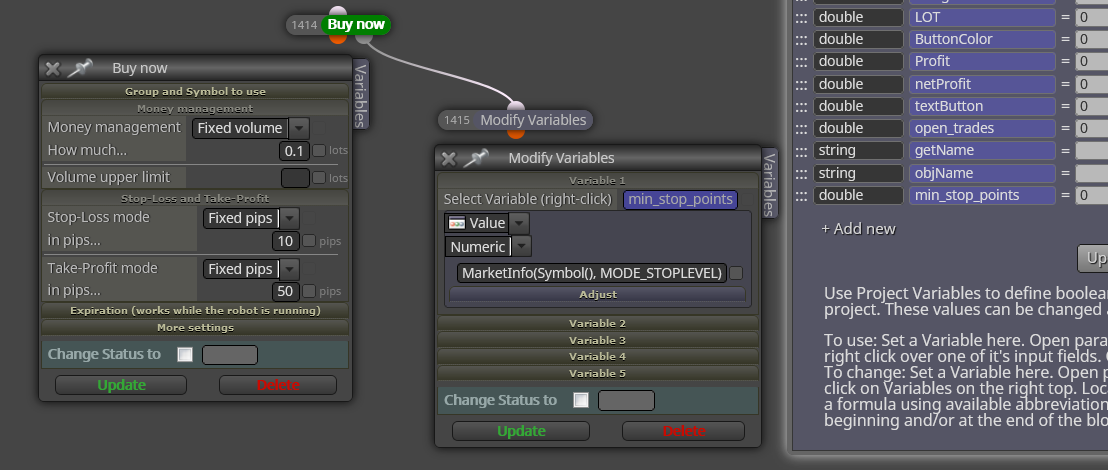
@miro1360 Hi, I have a Panel to open operations with different buttons to choose a symbol, my problem is that when I want the Trailing Stop to work, the pips of the EURUSD symbol are not the same with those of the DAX 30 or the S & P500, at the first 5 pips is normal but On the other hand, for DAX 30 the 5 pips should be 50 or even 500 since even the minimum lot per trade is 0.01 for EURUSD and 0.1 for DAX30, how can I make the trailing stop change the pips from 5 to 500 according to the symbol?
Posts made by XYON126
-
Selection according to Symbolposted in Questions & Answers
-
RE: button problems (solucionado)posted in General Discussions
@cesardefez Hola @cesardefez ! Te respondo por partes:
Sobre mi panel, no tengo ningun problema pero como te comentaba esta en MT4 y no he probado pasarlo a MT5 y no se si es 100% compatible ya que hay muchas variables y bloques de codigo, si quieres pasarlo a Mt5 o pasarte a MT4, sin problemas.
Sobre los botones 1% y 0.5%, no a lo de interruptor o pulsador, creo que o me he explicado mal o lo has entendido mal, explico funcionamiento del EA o Panel:1º Funcionamiento del EA o procedimiento:
a) Antes de abrir una operacion he de saber donde quiero tener mi SL para ello utilizo y presiono el boton amarillo de "Dibujar linea SL", al presionarlo automaticamente me dibuja una linea Horizontal seleccionable de color amarillo.
b) Una vez me ha aparecido la linea Horizontal amarilla con el raton la selecciono y muevo hasta el lugar que quiero se situe mi SL.
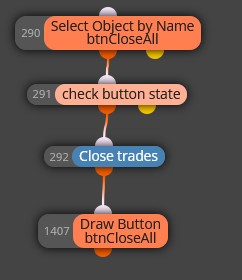
c) Una vez he situado y posicionado mi SL (linea amarilla horizontal) es cuando presiono el boton correspondiente a la operacion que deseo realizar, aqui es cuando entran los 6 botones de operaciones los 3 de SELL y los 3 de BUY donde a la izquierda me permiten que se abra la operacion con un riesgo del 1% o 0.5% del Balance(Esto si lo quieres con la Equidad no hay problema) a tener funcionamiento e importancia, ¿como funcionan? Tienen una formula que calcula la distancia que hay en este momento entre la linea amarilla horizontal y el precio actual, una vez obtenida la distancia calcula cuantos lotes son necesario para que se cumpla segun el boton seleccionado el 1%, 0.5% 3€ o 5€ y si la distancia en pips es igual o superior al minimo que te permite el Brocker te abre la operacion, todas las operaciones estan con un Ratio de 5:1, naturalmente todo es modificable en el EA pero no configurable ya que son constantes y asi libero de memoria el EA.Los otros botones por ejemplo los del Breackeven color Lila, uno te pone el SL si la operacion tiene ganancias superior a dos Pips te pone el SL a 1 pip ganador para contrarestar comisiones y Spread y el otro el de Breackeven 5 pips, pues eso idem al anterior pero en vez de 1 pips te lo pone a 5 pips, el de "close All" te cierra todas las operaciones abiertas en el PAR activo que como ya espècifique se cambia en la ventana (no abre nuevas ventanas, siempre es la misma) presionando el boton amarillo del PAR.
Algo que te quiero aclarar, posiblemente tu lo hayas conseguido a mi me dio problemas y los elimine, inicialmente tenia muchos mas botones (operaciones ganadoras, perdedoras, pendientes, etc.) mas o menos como lo tienes tu y el problema del reseteo como nadie me informo como hacerlo al final la solucion que encontre es en Init tener los botones iniciales, otros en el on Timer y al final de cada operacion el boton para desactivar y creo (tendria que mirar el EA) lo coloque al final del Close All, en tu caso deberias de ponerlo al final de todos los botones ya que siempre se actualiza cada Tick y si no hay operaciones se pone a cero, yo lo intente con variables pero me dio tantos problemas que pase y busque esta solucion.
Bueno espero haberte ayudado, ya me diras el que.

NOTA: Por cierto, existe un bloque para limitar las aperturas de operaciones, es decir, lo que haces con el boton INVERNAR te lo hace ese bloque sin necesidad de crear un boton, si es lo que quieres, otra cosa sera que cuando tengas una cantidad de operaciones abiertas un dia sean 10 y otro dia sean 20, etc. presiones tu boton invernar y te bloque la apertura de mas operaciones a partir de ese momento.

-
RE: Post problemsposted in Questions & Answers
@l-andorrà Hola @l-andorrà, no, no lo soy tengo la cuenta hasta un año y tengo mas de 3 ptos de bonificacion que creo son imprescindibles y con cta. de hace mas de 6 meses, la prueba son los paneles y EA,s que creo que suelen tener entre 150 y 300 bloques y sabes que mas de 10 son lo maximo para una cta. gratuita, solo tienes que mirar los links de mis EA,s o paneles y las fotos de los mismos que he creado y solo en botones hay mas de 10.
-
RE: button problems (solucionado)posted in General Discussions
@cesardefez Hola @cesardefez , veo que ablas español mejor porque asi nos entenderemos mejor. Lo primero que he visto (lo he cargado en un MT5) es que el "Margen max. " te sale desplazado, ¿Es correcto? por el tema de los botones si me detallas que funcion tiene cada uno podre analizarlo a fondo aunque se parece mucho a un Panel mio (ver foto), Lo que mas dudas me provoca son el boton "Close Line, Open line, Invernar y Reset"; comentas que el bucle no se actualiza, ¿A que te refieres, que no se pone a cero?, aqui tienes la foto de mi panel:

La información que da es:
Botones grises: te dan el valor de las ganancias totales de todos los pares, cambia de color rojo si esta en perdidas, en verde si esta en ganancias y gris si es a "cero" o no hay operaciones.
Botones naranjas : Pues eso lo que indica, la cantidad de operaciones totales abiertas.
Boton amarillo "Dibujar linea SL : Con este boton loque realizo antes de hacer nada lo presiono y me dibuja una linea horizontal en el precio actual, esta linea una vez dibujada te permite desplazarla al lugar donde quieres el Stop Loss.
Botones verdes y rojos: Con la linea horizontal situada donde queremos el SL al presionar cualquier boton te calcula segun el boton los Lotes necesarios para que el riesgo sea del 1% Capital, 0.5Capital, 5€ o 3€ segun el boton que presione.
Boton azul claro "Show/No Show": este boton es para esconder o visualizar los botones que hay debajo.
Botones amarillos del PAR: si presionas el boton amarillo te cambia el DRAFT o VENTANA actual al par presionado manteniendo la temporalidad y activando los botones para ese PAR.
Botones blancos: Las dos columnas de botones blancos al lado de los amarillos del PAR a la izquierda informan en rojo operaciones abiertas tipo SELL en ese PAR, en verde las BUY y la columna de botones blancos alargados a la derecha de los amarillos del PAR te informa del beneficio o perdida de ese par de sus operaciones abiertas en el PAR.
Los otros hacen lo que indican en el PAR activo el de la ventana actual.Naturalmente esta en MT4 pues como te comentaba en MT5 aparte de que mi Brocker de cta real no lo acepta para tener un DARWING tambien me daba problemas de retraso, aunque en MT4 a veces se encalla.
Punto importante, si la distancia de la linea amarilla que te genera el Panel, su distancia es inferior al minimo del Stop Loss que te permite el Brocker en el PAR activo al abrir la operacion o no la abre, o la abre sin SL y TP con un lotaje igual al minimo estipulado por defecto 0.02 lotes. Esto ultimo es un problema global pues todos los paneles de todos los programadores que conozco tienen el mismo problema.
Espero esto te ayude, ya me diras.
-
RE: display distance between a horizontal line and current price in pipsposted in Questions & Answers
@mark_madhukar Hello Mark!
I have managed to generate this with several buttons:1º A horizontal line is drawn at the current price.
2nd The line obtained is selectable so that it can be moved and placed where it is needed, that is to say, place it where I want the Stop Loss
3rd Pressing the operations button calculates the distance in pips from the horizontal line to the current price and opens a trade with the Stop Loss where the horizontal line is and with the necessary lot.
If this is what you need, I will give you the EA to study it or maybe it is what you want to do with some change and I will do it for you. -
RE: joker TO SELECT OBJECTposted in General Discussions
@cesardefez Hi Cesar! Exactly what you want to obtain in the end, is in case the approach can be otherwise. On the other hand in the forum "Tutorial by User" I think that this topic has been mentioned but for other purposes and perhaps you have more information. Regarding the first, if I don't understand what it is for, I can't help you.
-
RE: button problems (solucionado)posted in General Discussions
@cesardefez Hi Cesar! The problem you are commenting on for me is known since I have made many panels with many buttons, I will tell you:
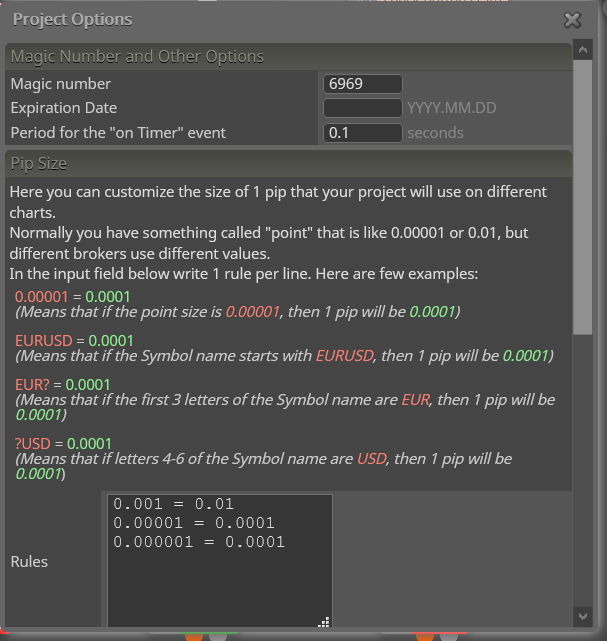
It is very important that the buttons are in the "on Timer" tab since, on the contrary, it will only be executed in each tick if it is in "on Tick", the variable as you say should not be greater than one second but in the upper tabs In "Options"> Project Options (photo) there is a section at the beginning 3rd window "on Timer" must have the same value as the variant or constant or it is delayed) I know from experience) @roar or @miro1360 can inform you better. Another problem that slows down and I don't know why, is the size of the EA or the number of Blocks, I particularly have detected that when it exceeds 155 and I don't know why everything slows down and sometimes it doesn't run, it could be software limitations, also depends a lot on the Metatrader MT4 or MT5, the latter is worse than the MT4 and gives more problems and finally the Brocker, I have several MT4 from several Blocker and I have detected that from one to another the same EA works in MT4 very different, since it can have or obtain information on the spread and if its range is lower than that of the Brocker or it does not execute anything or it takes until the minimum pips are applied.Pass the LINK of your complete button, because a photo says little, I can also help you.

-
Post problemsposted in Questions & Answers
@fxDreema It helps, every time I try to post a photo in one of my posts, I get a window that I do not have privileges to execute that action. Because sometimes I can and 80% give me that error?
Thanks a lot -
RE: button problems (solucionado)posted in General Discussions
Hello @roar ! In this example that I attach in the photo, how and where would you apply what you say?

-
RE: draw label and arrows in operationsposted in Questions & Answers
@l-andorrà Nothing, he opens the operation for me and does nothing else.
-
draw label and arrows in operationsposted in Questions & Answers
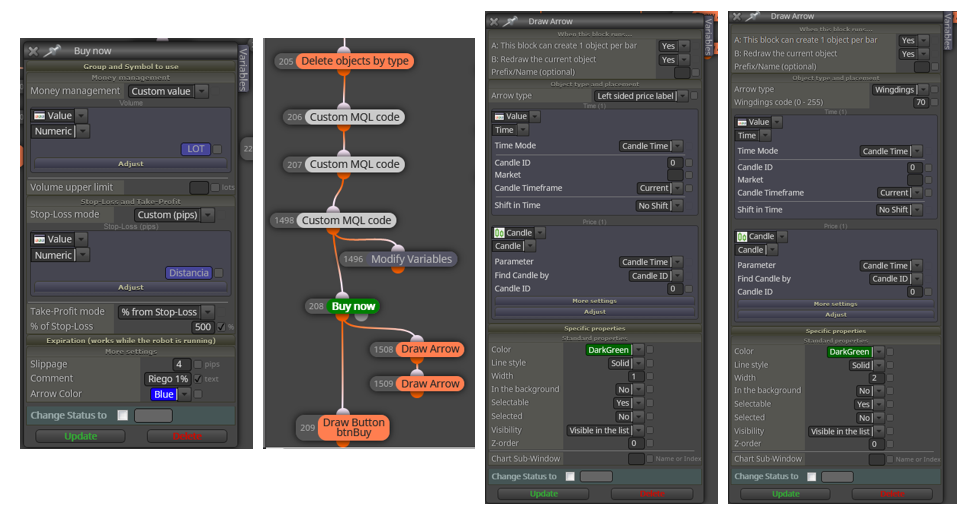
Hello! I need help, I want a label to be drawn next to the candle when I open an operation at the same opening point and also to redraw another Label right at the close of the operation and join with a line at the beginning of the operation with the end of it, something similar as it appears in the MT4 Backtesting windows. How can I do it?
Here I show you how I have done it but it does not work for me, this operation is opened from a panel by pressing a button, so the last block is a button to close it.

Thanks a lot
-
RE: display distance between a horizontal line and current price in pipsposted in Questions & Answers
@mark_madhukar Specify me exactly what you want to do and get, and if you have already done something, share it, put the EA link, not a photo because the important thing is the interior and not the blocks that are very important but even more how they are configured.
-
RE: Minimum Stop Loss allowed vs. coinposted in Questions & Answers
@ambrogio Thank you very much for trying to help me.
-
RE: Draw Tredlineposted in Questions & Answers
@l-andorrà Hello @l-andorrà! about if it is possible I think so, I think that variables will be needed, one for each point (initial and final) and that with some block of the "mouse" where it allows you to select a point or vertex that each mouse click is directed to a variable and with those two variables introduce them to the Tredline block, my problem is these three points:
1st Mouse block to select the point.
2º A comment that warns you to select by clicking with the mouse each of the points.
3rd Option of the Block to create the Tredline with the points obtained and saved in two variables. -
RE: Minimum Stop Loss allowed vs. coinposted in Questions & Answers
Thank you very much to both of you, I hope @Banditdos understands it, by the way @roar , @ambrogio could you look at this Link: "http://fxdreema.com/forum/topic/11525/draw-tredline/7" and help me, since the answers they have given me have not helped me at all and I think that you can help me.
-
RE: @roar, Sell now and Buy now with% of Balance or% of Equity but with minimum lot. (Solved)posted in Questions & Answers
@pontedruse OKAY! Thank you very much @pontedruse. One more question, would you be so kind to look at this post and help me, since no answer given has helped me and possibly you know how to do it.
-
RE: Minimum Stop Loss allowed vs. coinposted in Questions & Answers
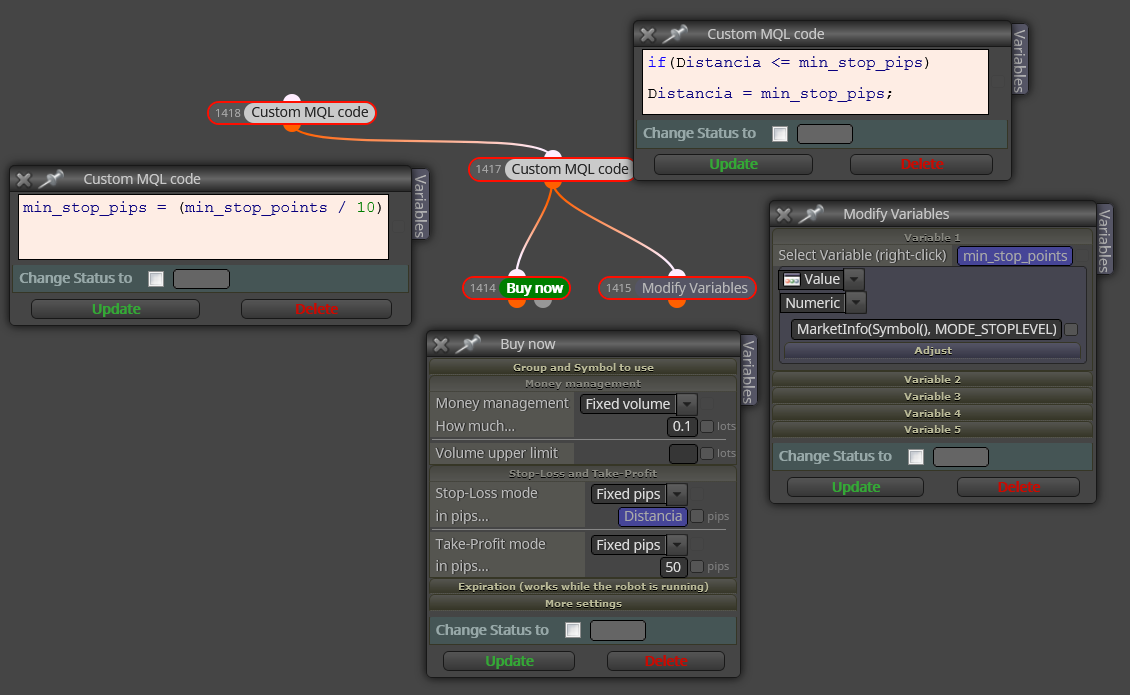
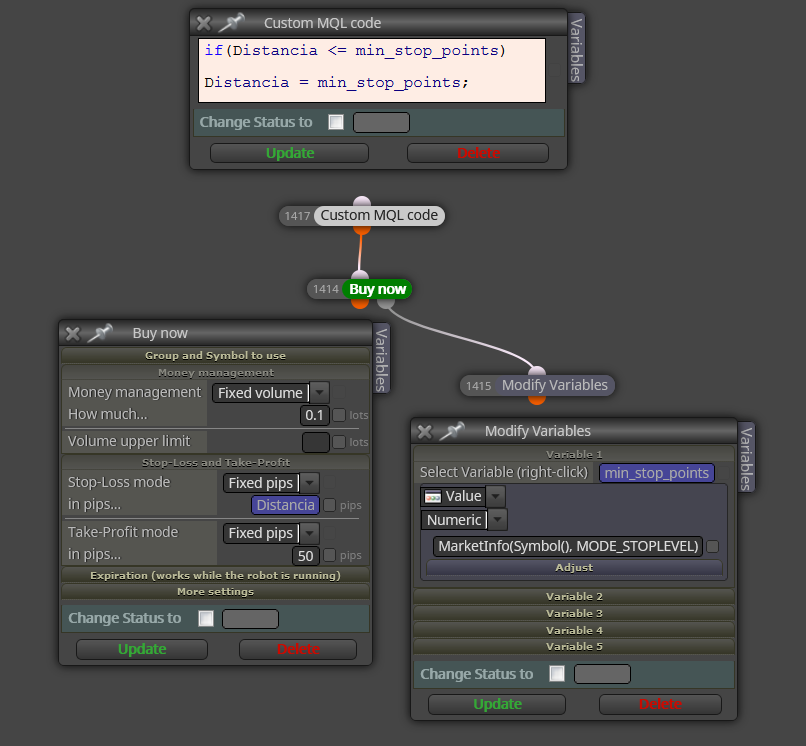
@roar By the way, you have put "min_stop_points" that is, if we want them to be "pips" we have to divide it by 10, is that correct?
That is, this:

-
RE: Minimum Stop Loss allowed vs. coinposted in Questions & Answers
@roar Sorry, how is this function incorporated, with the MQL block and variables? Would you be so kind to put a picture of the block with the formula because I think @Banditdos will appreciate it. Thanks a lot.