fxDreema

    • Register
    • Login
    • Search
    • Back to the main page
    • Categories
    • Recent
    • Tags
    • Popular
    • Search
    1. Home
    2. XYON126
    3. Posts
    • Profile
    • Following 0
    • Followers 6
    • Topics 57
    • Posts 383
    • Best 24
    • Controversial 2
    • Groups 0

    Posts made by XYON126

    • RE: Video Tutorial - Signals Dashboard EA [advanced] - looping Objects, arrays

      @miro1360 Thank you very much @miro1360, , you are right in that, with practice knowledge increases; by the way, about what you highlight in the photo (very important) a query arises, I have been looking at MT4 and I have not been able to find information on the variables and formulation that you use or at least uneducated as I understand it , although I have knowledge of Visual Basic 6.0 programming (it is just as old as me :-)) and thanks to that I understand the language well but not to that point, where can I find that well explained information? Thank you very much in advance.

      posted in Tutorials by Users
      XYON126
      XYON126
    • RE: Video Tutorial - Signals Dashboard EA [advanced] - looping Objects, arrays

      @miro1360 Thank you, Thank you very much. @miro1360, I am envious of you. Could you give me a little of your wisdom for Christmas. MERRY CHRISTMAS AND A HAPPY NEW YEAR. Very, very grateful. ;-).

      I am going to study it to the millimeter, it is very valuable information.

      posted in Tutorials by Users
      XYON126
      XYON126
    • RE: Video Tutorial - Signals Dashboard EA [advanced] - looping Objects, arrays

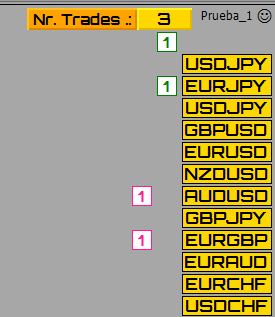
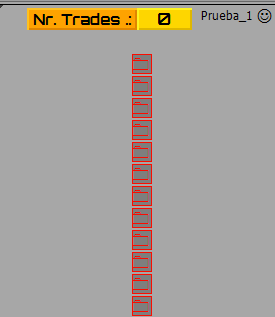
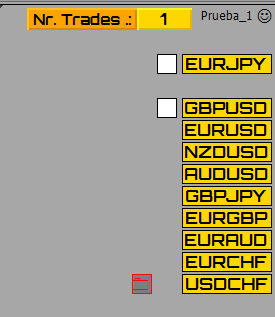
      @miro1360 Hi @miro1360, thank you very much for the comments and help, for what you comment with the profit for PAR I see that it will not be possible and having only the amount next to the pair it will be worth the same. I have modified everything and what I have done is two columns, one for purchases and one for sales, but even so it gives me problems; In the photo there are 3 open operations as indicated in the upper part where it indicates the total of operations but in those of the pairs when there are no pairs a button with a zero should appear and it does not come out, and it generates a button in the air that I don't know why, another problem is that when everything is left to zero the upper panel does not reset and the columns of the pair operations do not appear, And I get the trading buttons one position above par and not to the side. where are the errors? Well, I think it's simplified and now it should be fine. I'm not a computer scientist and I am unable to find the errors. Thanks a lot.

      0_1608022872241_cf836ab6-6741-4740-b1b5-5defcc6f7c9e-imagen.png

      https://fxdreema.com/shared/UASMeWOfd

      posted in Tutorials by Users
      XYON126
      XYON126
    • RE: Video Tutorial - Signals Dashboard EA [advanced] - looping Objects, arrays

      @miro1360 Hello @miro1360, thank you very much for the help. I have made the changes you have mentioned (I think I have understood it correctly) and I get the one in the photo, where are the errors?

      0_1608005985657_e86e64d7-5331-4148-98ad-4f2a8db04995-imagen.png

      https://fxdreema.com/shared/Fjl7fF6kc

      posted in Tutorials by Users
      XYON126
      XYON126
    • RE: Video Tutorial - Signals Dashboard EA [advanced] - looping Objects, arrays

      @miro1360 Hello, I am making this concept of the photo with your panel, the problem I have is the one seen in the photo, my idea is that in the panel next to each PAR I get the number of open operations in that PAR and that in another button I get an arrow up green or down red If the profit is positive or negative but I am not, what I get is the photo, I do not get all the buttons in any column, it deletes the PAR and when I delete the EA I have a button and it does not delete it. Please, what am I doing wrong? Thank you.

      0_1607973140565_bca89d7b-ac59-42d9-926b-89be0f86ec0d-imagen.png

      https://fxdreema.com/shared/Ohnb0CqMb

      posted in Tutorials by Users
      XYON126
      XYON126
    • RE: Break Even Button

      @l-andorrà said in Break Even Button:

      @xyon126 Te decía que estás usando bloques de bucles que sólo funcionan en la pestaña 'on tick'. Nunca te funcionarán en la pestaña 'on timer'.

      Hola @l-andorrà Andorra, Que bloques dices que son de uso exclusivo para "on Tick"? ¿Dónde puedo encontrar información de bloques específicos por tipo de pestaña "on Tick, on Timer, etc"?

      Independiente de si esta en "on Timer" o en "on Tick" ya que he probado en ambas pestañas, ¿Porque no me funcionan, que esta mal o que falta?

      posted in Questions & Answers
      XYON126
      XYON126
    • RE: I want to create three continous candle and close by opposite candle

      @l-andorrà Hello @l-andorrà Andorra. In answer to your question, that is a photo of the automatic Backtest with the MT4, it only made a total with the last version 77 operations and 12 valid in 5 years in M30, since in H1 or M15 it was more or less but in losses, in M5 240 and in H1 24 and H4 12. That is why it shocks me when in a period of almost 2 months (photo M30) it did not open any and there was no open order when according to the photo there could have been at least 4 open.

      posted in Questions & Answers
      XYON126
      XYON126
    • RE: Break Even Button

      @l-andorrà This is my idea but I don't know why it doesn't work.
      Losers

      0_1607610655813_db3adcb6-a955-4907-8e81-388bb3778f35-imagen.png

      https://fxdreema.com/shared/ydezxuQNc

      posted in Questions & Answers
      XYON126
      XYON126
    • RE: help

      @tuhand Hello @tuhand the photo is very good but if you do not tell us what structure, conditions, etc. your robot must fulfill it is impossible to do it we are not in your mind.

      posted in Questions & Answers
      XYON126
      XYON126
    • RE: Break Even Button

      @l-andorrà Perdona, dimelo en español, no te he entendido.

      posted in Questions & Answers
      XYON126
      XYON126
    • RE: I want to create three continous candle and close by opposite candle

      @l-andorrà Hello Andorra, I have corrected what you were saying, in fact I have eliminated everything and I only have what is left for the strategy, and as you see in the photo (extracted from the EA backtest)

      0_1607537260250_a35677e0-4df6-4089-a11e-fd8a24f6d2e0-imagen.png

      in that area you should open an operation in BUY with an arrow green and SELL with a red arrow but in the 5-year Backtest it has only opened 12 operations. To what is due?

      https://fxdreema.com/shared/juXV6Qfmb

      posted in Questions & Answers
      XYON126
      XYON126
    • RE: get the pip price in the current pair (Solved)

      @l-andorrà Tranquilo, pense que no lo conocias y al descubrirlo lo he posteado. 😉

      posted in Questions & Answers
      XYON126
      XYON126
    • RE: get the pip price in the current pair (Solved)

      @l-andorrà Thanks I have already found it, it is direct.

      0_1607529554519_729d13c0-ef2a-4ba7-9810-3de305aa6ed2-imagen.png

      posted in Questions & Answers
      XYON126
      XYON126
    • RE: I want to create three continous candle and close by opposite candle

      @l-andorrà Which one do you mean, one per bar?

      posted in Questions & Answers
      XYON126
      XYON126
    • Break Even Button

      Hi. I am trying to make a button for Break Even but what in theory should work does not, could you help me and tell me where I have the error? Thanks a lot.

      https://fxdreema.com/shared/rUfZd62bc

      posted in Questions & Answers
      XYON126
      XYON126
    • RE: How to repeat pending trades until TP hit

      @kailykail Here you have a panel that opens operations in SELL and BUY and with another button that closes all those of the pair. You also get two fixed information buttons that inform you of the current total profit of all the operations of all the pairs that you have open, in gray it is with a profit of "0" zero, red profit in losses and green in profits. The operations that he opens are with a risk of 1% of the gross balance with 20 pips of Stop Loss and a Take Profit of 70 pips, if the resulting lot (depends on the account) is less than 0.02 lots, it will put a risk of 0.02 Minimum lots, naturally everything is configurable from the outside with the EA running or you can change it to your liking. When you open the Link, save the mt4 on your PC and so when you import it from your PC's fxDreema it will come with the variables. Automatically removes the colored texts that appear when loading EA in the lower left corner and when you close, you delete the EA from the MT4, it clears the screen.

      I hope you like it, as a start and information it will be very useful. Here you have the link:

      https://fxdreema.com/shared/XCc3yo7vb

      Ah! Above all, TRY IT IN A DEMO ACCOUNT and once you are very sure you can try it in real but when you are very, very sure that it works for you and that you are doing well. I am not responsible for its use, it is only educational and informative.

      Very important! You will see that almost the entire tab is "on Timer", many will tell you that it is better in "on Tick" for strategy EA, yes, if it is better in "on Tick" but for panels if you want the response immediately you should have it in "On Timer" the constant "updateIntervalSec" must be 0.1 and in the other tab (photo) it must be the same period of time or it will take you a long time to answer since by default it is 60 seconds; if it were in "on Tick" you will be executed step by step for each tick and the tick is produced approx. every 60 sec. It depends on the Brocker so a panel in H1 can go slow but in M15, M5 and M1 what you want is a response as soon as possible and without delay.
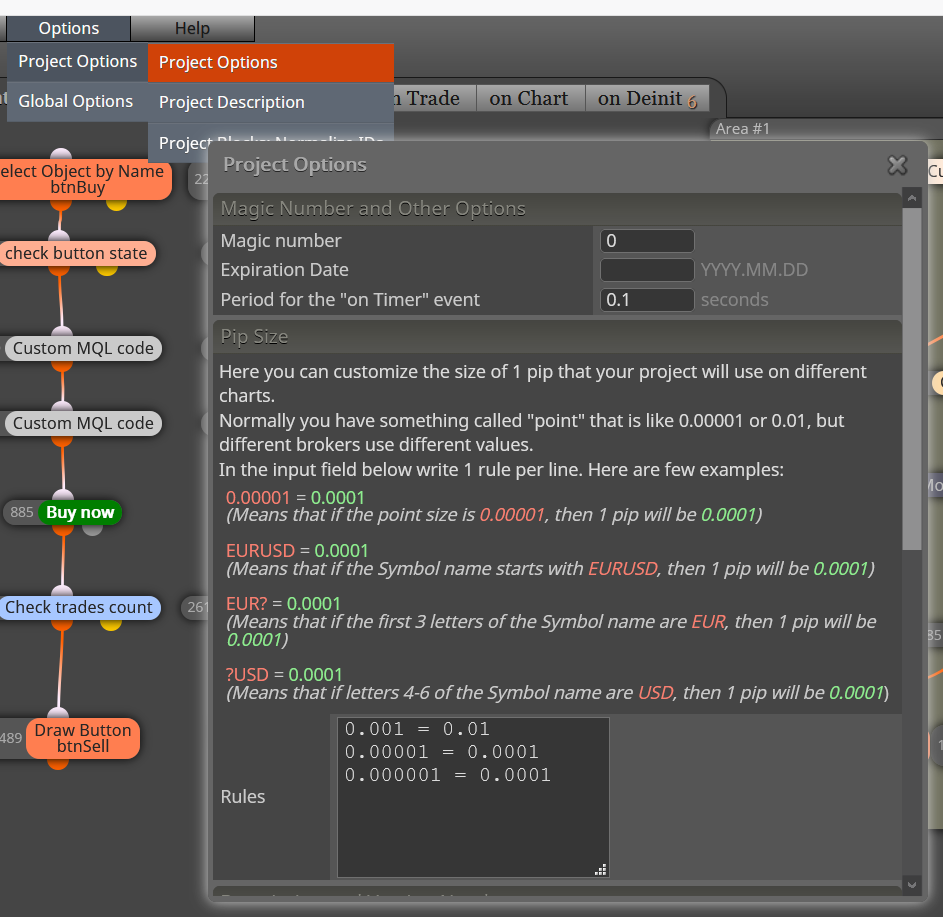

      0_1607505434770_1125d860-17ac-4dbb-a556-18377b7d2310-imagen.png

      posted in Questions & Answers
      XYON126
      XYON126
    • RE: How to repeat pending trades until TP hit

      @kailykail If you want to make a button and you do not know, comment it and I will help you, you have a second option, this option is when you want to open an operation because something has been accomplished in your EA, set an alarm so you will not be pending, since when it jumps the alarm you will only have to press the appropriate button.

      posted in Questions & Answers
      XYON126
      XYON126
    • RE: get the pip price in the current pair (Solved)

      @l-andorrà Thanks a lot @l-andorrà . But it does not work for me for what I need, perhaps I have explained myself wrong, what I want to do is put a button on a panel with the amount of € that I want to have as a maximum risk depending on the size of the STOP LOSS, that is, either 20 pips the SL or 10 pips that the risk is always € 5; Is there a block that can do this or that can put that value in a variable for calculation?

      posted in Questions & Answers
      XYON126
      XYON126
    • RE: How to repeat pending trades until TP hit

      @kailykail I understand that as a switch it refers to a button, is that so?

      posted in Questions & Answers
      XYON126
      XYON126
    • RE: I want to create three continous candle and close by opposite candle

      @l-andorrà Hello @l-andorrà, as I understand what @Homemebel asks is something like this:

      https://fxdreema.com/shared/xQsou2r5

      I have tried it and there is no operation. Where is the error?

      posted in Questions & Answers
      XYON126
      XYON126
    • 1
    • 2
    • 7
    • 8
    • 9
    • 10
    • 11
    • 19
    • 20
    • 9 / 20